postgres=# SELECT hostname, COUNT(content), role
FROM gp_segment_configuration GROUP BY hostname, role ORDER BY hostname;
      hostname      | count | role
--------------------+-------+------
 mdw                |     1 | p
 sdw1               |     5 | m
 sdw1               |     2 | p
 sdw2               |     2 | m
 sdw2               |     4 | p
 sdw3               |     3 | p
 sdw3               |     2 | m
(7 rows)GREENGAGE SHRINK
What has been going on with shrink and Iceberg connector
17.12.2025
In this article, we will share some details of working on new Greengage features such as shrink and expand, improved foreign tables inserts, and developing Apache Iceberg integration (Greengage-to-Iceberg connector).

Andrey Savitskiy
Principal Architect
Contents
Hello everyone from the Greengage team!
In this article, we will share news with you concerning:
-
the progress of developing the cluster’s shrink feature, which has "evolved" into a full-fledged cluster rebalance that includes either a shrink or an expand of the cluster;
-
a new feature for redistributing inserts across specified columns in the
foreigntype tables; -
some spoilers about future integration with Apache Iceberg.
Make yourselves comfortable, we are starting.
ggrebalance
At the beginning of 2025, we announced that our team started working on cluster shrink implementation.
It quickly became clear that a shrink, in the general case, leads to the need to subsequently bring the cluster to a balanced state, i.e. to a cluster rebalance.
Thus, the cluster shrink utility evolved into the cluster rebalance utility ggrebalance.
In this article, I will focus on the user-facing characteristics of the solution and will not go deep into technical aspects. We will reveal the details in separate articles.
So, ggrebalance solves several tasks at once:
-
removing segments followed by rebalancing the remaining segments across hosts;
-
removing/adding hosts followed by segment rebalance.
ggrebalance will also include the familiar capabilities provided by the gpexpand utility.
The main set of scenarios considered during design:
-
Adding new hosts to the cluster without changing the number of segments.
-
Adding new hosts to the cluster while adding new segments. This may be adding some fixed number of new segments to the cluster with subsequent rebalance, or adding a number of segments determined by the current cluster configuration (a scenario similar to the usual
gpexpand). -
Removing hosts from the cluster without changing the number of segments.
-
Removing hosts from the cluster with removal of existing segments.
-
Moving segments to some set of hosts without changing the number of segments.
-
Moving segments to some set of hosts with changing the number of segments (shrink or expand).
-
Adding new segments without changing the set of hosts.
-
Removing existing segments without changing the set of hosts.
-
Changing the mirroring strategy and bringing the current scheme to one of the standard ones:
groupedorspread.
The main principles and ideas according to which we are developing ggrebalance:
-
One utility for implementing different scenarios related to changes in cluster "topology".
-
The ability to resume a started rebalance scenario after work is interrupted (for example, due to an abnormal termination).
-
Connected to the previous point, the ability to provide the administrator with interactive decision-making aims:
-
Choosing further actions in case of errors (canceling further attempts to move segments, rolling back to the previous state).
-
Choosing the moment of role switching (which may lead to canceling current queries).
-
-
Reducing mirror unavailability when performing segment movement.
Among the main features:
-
INSERT SELECTbased shrink rather thanCREATE TABLE AS SELECTshrink (moving rows from the removed segment generally takes less time than recreating a table from scratch). -
Support for specifying lists of added or removed hosts, including specifying a new list of hosts, on which the cluster rebalance must be performed (options accepting a host list:
--target-hosts,--add-hosts,--remove-hosts, and several others). -
The ability to specify the target number of segments on which the cluster rebalance must be performed (cluster shrink or expand scenarios, the
--target-segment-countoption). -
The ability to set duration of the rebalance session from beginning to end (similar to the
--endand--durationparameters in thegpexpandutility). -
The ability to view the rebalance plan (dry run) without physically moving segments (the
--show-planoption). -
The ability in some scenarios to perform rollback (the
--rollbackoption). -
Support for performing cluster rebalance according to the chosen mirroring strategy (
groupedorspread).
We will show the work of ggrebalance on several example scenarios (in the production version, console output and some other nuances may change).
Let’s assume that our cluster is a set of segments distributed across the following set of hosts:
As we can see, the cluster is currently not balanced.

Unbalanced cluster
Let’s ask ggrebalance to bring cluster in balanced state without changing the set of hosts, according to the grouped strategy.
First, let’s view a plan by running ggrebalance with the --show-plan option (for mirroring strategy, choose grouped using --mirror-mode):
$ ggrebalance --show-plan --mirror-mode grouped
20251127:13:19:56:3990504 ggrebalance:mdw:gpadmin-[INFO]:-Init gparray from catalog
20251127:13:19:56:3990504 ggrebalance:mdw:gpadmin-[INFO]:-Validation of rebalance possibility
20251127:13:19:56:3990504 ggrebalance:mdw:gpadmin-[INFO]:-Planning rebalance moves. Can take up to 60s.
20251127:13:19:56:3990504 ggrebalance:mdw:gpadmin-[INFO]:-Running randomized plan improvement with seed:155941400336372386876681048343334492835
20251127:13:19:56:3990504 ggrebalance:mdw:gpadmin-[INFO]:-Final plan:

---------------------------------BALANCE MOVES----------------------------------
Total moves planned: 4

Move #1:
Move Segment(content=1, dbid=5, role=m)
      From: sdw3:50310 → /data1/mirror/gpseg1
      To:   sdw2:10223 → /data1/mirror/gpseg1

Move #2:
Move Segment(content=3, dbid=7, role=m)
      From: sdw1:50130 → /data1/mirror/gpseg3
      To:   sdw3:10367 → /data1/mirror/gpseg3

Move #3:
Move Segment(content=4, dbid=8, role=m)
      From: sdw1:50140 → /data1/mirror/gpseg4
      To:   sdw3:10369 → /data1/mirror/gpseg4

Move #4:
Move Segment(content=5, dbid=14, role=p)
      From: sdw2:10350 → /data1/primary/gpseg5
      To:   sdw1:50141 → /data1/primary/gpseg5
As we can see, ggrebalance plans to distribute the segments as follows.
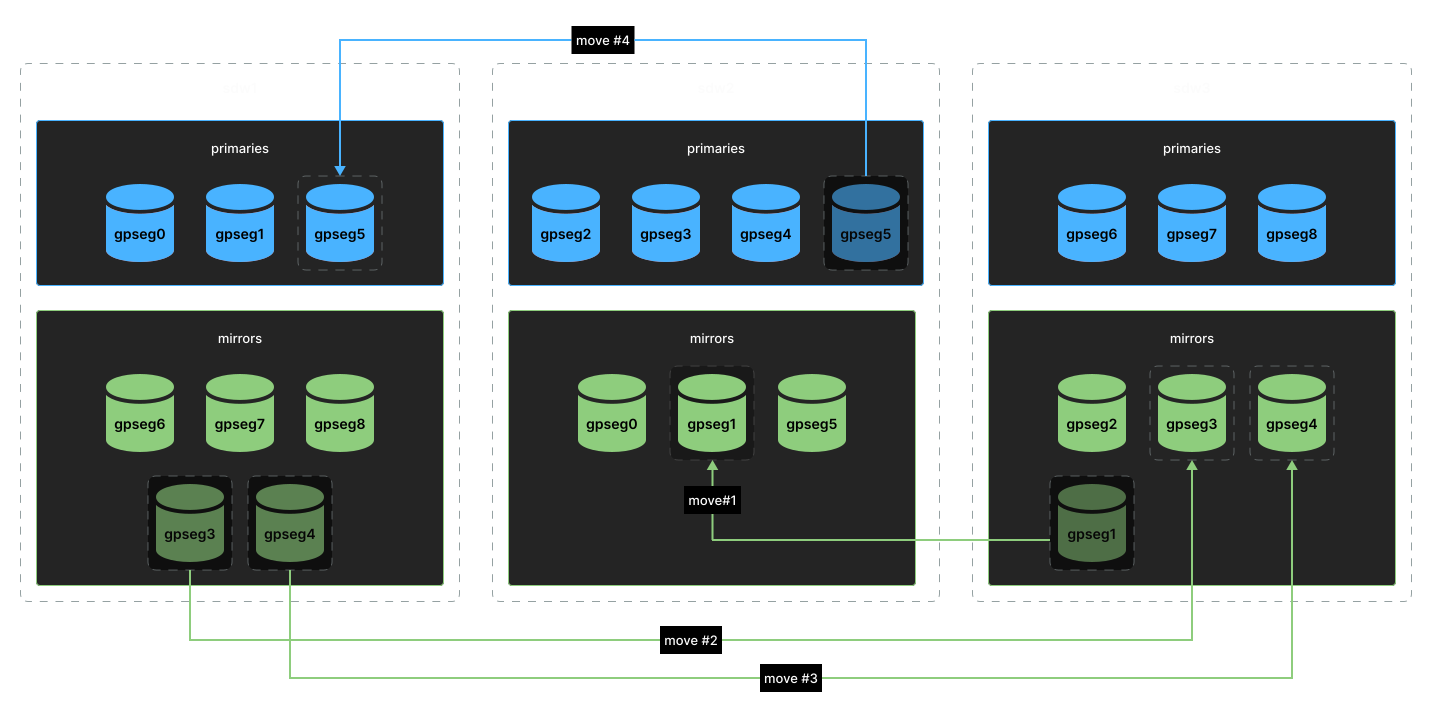
Cluster balancing plan
Now perform the redistribution of segments according to the plan:
$ ggrebalance --mirror-mode grouped
20251117:16:39:40:2261495 ggrebalance:mdw:gpadmin-[INFO]:-Init gparray from catalog
20251117:16:39:40:2261495 ggrebalance:mdw:gpadmin-[INFO]:-Validation of rebalance possibility
20251117:16:39:40:2261495 ggrebalance:mdw:gpadmin-[INFO]:-Planning rebalance moves. Can take up to 60s.
20251117:16:39:40:2261495 ggrebalance:mdw:gpadmin-[INFO]:-Running randomized plan improvement with seed:83285156933668510164345869375561513208
20251117:16:39:41:2261495 ggrebalance:mdw:gpadmin-[INFO]:-Planning rebalance done
20251117:16:39:41:2261495 ggrebalance:mdw:gpadmin-[INFO]:-Created rebalance schema ggrebalance
20251117:16:39:41:2261495 ggrebalance:mdw:gpadmin-[INFO]:-Executor started
20251117:16:39:44:2261495 ggrebalance:mdw:gpadmin-[INFO]:-About to run gprecoverseg for mirror move (dbid = 8, content = 4) sdw1|50140|/data1/mirror/gpseg4 sdw3|10369|/data1/mirror/gpseg4
20251117:16:39:44:2261495 ggrebalance:mdw:gpadmin-[INFO]:-About to run gprecoverseg for mirror move (dbid = 5, content = 1) sdw3|50310|/data1/mirror/gpseg1 sdw2|10223|/data1/mirror/gpseg1
20251117:16:39:44:2261495 ggrebalance:mdw:gpadmin-[INFO]:-About to run gprecoverseg for mirror move (dbid = 7, content = 3) sdw1|50130|/data1/mirror/gpseg3 sdw3|10367|/data1/mirror/gpseg3
20251117:16:40:54:2261495 ggrebalance:mdw:gpadmin-[INFO]:-Removing old segment's datadir (dbid = 7): /data1/mirror/gpseg3
20251117:16:40:54:2261495 ggrebalance:mdw:gpadmin-[INFO]:-Removing old segment's datadir (dbid = 8): /data1/mirror/gpseg4
20251117:16:40:55:2261495 ggrebalance:mdw:gpadmin-[INFO]:-Removing old segment's datadir (dbid = 5): /data1/mirror/gpseg1
20251117:16:40:59:2261495 ggrebalance:mdw:gpadmin-[INFO]:-Executing role swaps for 1 segments
20251117:16:41:33:2261495 ggrebalance:mdw:gpadmin-[INFO]:-About to run gprecoverseg for mirror move (dbid = 14, content = 5) sdw2|10350|/data1/primary/gpseg5 sdw1|50141|/data1/primary/gpseg5
20251117:16:42:44:2261495 ggrebalance:mdw:gpadmin-[INFO]:-Removing old segment's datadir (dbid = 14): /data1/primary/gpseg5
20251117:16:42:48:2261495 ggrebalance:mdw:gpadmin-[INFO]:-Executing role swaps for 1 segments
20251117:16:43:07:2261495 ggrebalance:mdw:gpadmin-[INFO]:-Executor done
20251117:16:43:08:2261495 ggrebalance:mdw:gpadmin-[INFO]:-Rebalance done
In the end, we get a balanced cluster:
postgres=# SELECT hostname, COUNT(content), role
FROM gp_segment_configuration GROUP BY hostname, role ORDER BY hostname;
      hostname      | count | role
--------------------+-------+------
 mdw                |     1 | p
 sdw1               |     3 | m
 sdw1               |     3 | p
 sdw2               |     3 | m
 sdw2               |     3 | p
 sdw3               |     3 | p
 sdw3               |     3 | m
(7 rows)
Let’s complicate the task — request a cluster shrink to 6 segments, but since the shrink (i.e. removal of the last 3 segments) in our case leads to an unbalanced cluster, the ggrebalance planner will take into account a rebalance stage. At the same time, we also request that hosts sdw1 and sdw3 be removed from the cluster and replaced by sdw4 and sdw5.
First, request a plan:
$ ggrebalance --mirror-mode grouped \
    --show-plan \
    --target-segment-count 6 \
    --add-hosts="sdw4,sdw5" \
    --remove-hosts="sdw1,sdw3" \
    --target-datadirs="/data1/primary/gpseg{content}","/data1/mirror/gpseg{content}"

20251127:12:16:04:3981145 ggrebalance:mdw:gpadmin-[INFO]:-Init gparray from catalog
20251127:12:16:04:3981145 ggrebalance:mdw:gpadmin-[INFO]:-Planning shrink
20251127:12:16:04:3981145 ggrebalance:mdw:gpadmin-[INFO]:-Validation of rebalance possibility
20251127:12:16:04:3981145 ggrebalance:mdw:gpadmin-[INFO]:-Planning rebalance moves. Can take up to 60s.
20251127:12:16:04:3981145 ggrebalance:mdw:gpadmin-[INFO]:-Running randomized plan improvement with seed:182202519713633465208461660014454186954
20251127:12:16:04:3981145 ggrebalance:mdw:gpadmin-[INFO]:-Final plan:
================================================================================
                                  SHRINK PLAN
================================================================================

Target Segment Count: 6

-------------------------------SEGMENTS TO REMOVE-------------------------------
Total segments to shrink: 3

  [1] Segment Pair:
      Primary:
        Content:  6
        DbId:     17
        Host:     sdw3
        Datadir:  /data1/primary/gpseg6
        Port:     10360
      Mirror:
        Content:  6
        DbId:     12
        Host:     sdw1
        Datadir:  /data1/mirror/gpseg6
        Port:     50160

  [2] Segment Pair:
      Primary:
        Content:  7
        DbId:     18
        Host:     sdw3
        Datadir:  /data1/primary/gpseg7
        Port:     10370
      Mirror:
        Content:  7
        DbId:     15
        Host:     sdw1
        Datadir:  /data1/mirror/gpseg7
        Port:     50170

  [3] Segment Pair:
      Primary:
        Content:  8
        DbId:     19
        Host:     sdw3
        Datadir:  /data1/primary/gpseg8
        Port:     10380
      Mirror:
        Content:  8
        DbId:     16
        Host:     sdw1
        Datadir:  /data1/mirror/gpseg8
        Port:     50180

---------------------------------BALANCE MOVES----------------------------------
Total moves planned: 9

Move #1:
Move Segment(content=1, dbid=5, role=m)
      From: sdw3:50310 → /data1/mirror/gpseg1
      To:   sdw5:10382 → /data1/primary/gpseg1

Move #2:
Move Segment(content=2, dbid=6, role=m)
      From: sdw1:50320 → /data1/mirror/gpseg2
      To:   sdw4:10385 → /data1/mirror/gpseg2

Move #3:
Move Segment(content=3, dbid=7, role=m)
      From: sdw3:50130 → /data1/mirror/gpseg3
      To:   sdw4:10387 → /data1/mirror/gpseg3

Move #4:
Move Segment(content=4, dbid=8, role=m)
      From: sdw1:50140 → /data1/mirror/gpseg4
      To:   sdw4:10388 → /data1/primary/gpseg4

Move #5:
Move Segment(content=5, dbid=11, role=m)
      From: sdw2:50250 → /data1/mirror/gpseg5
      To:   sdw4:10390 → /data1/primary/gpseg5

Move #6:
Move Segment(content=0, dbid=2, role=p)
      From: sdw1:10100 → /data1/primary/gpseg0
      To:   sdw5:10381 → /data1/mirror/gpseg0

Move #7:
Move Segment(content=1, dbid=3, role=p)
      From: sdw1:10110 → /data1/primary/gpseg1
      To:   sdw2:10223 → /data1/mirror/gpseg1

Move #8:
Move Segment(content=4, dbid=13, role=p)
      From: sdw2:10340 → /data1/primary/gpseg4
      To:   sdw5:10389 → /data1/primary/gpseg4

Move #9:
Move Segment(content=5, dbid=14, role=p)
      From: sdw2:10350 → /data1/primary/gpseg5
      To:   sdw5:10391 → /data1/mirror/gpseg5
In this scenario, ggrebalance plans segment movement as follows.

Transferring segments in a more complex scenario
Run rebalance combined with reducing the number of segments and moving some segments to other hosts:
$ ggrebalance --mirror-mode grouped \
    --target-segment-count 6 \
    --add-hosts="sdw4,sdw5" \
    --remove-hosts="sdw1,sdw3" \
    --target-datadirs="/data1/primary/gpseg{content}","/data1/mirror/gpseg{content}"

20251118:14:19:17:2750825 ggrebalance:mdw:gpadmin-[INFO]:-Init gparray from catalog
20251118:14:19:17:2750825 ggrebalance:mdw:gpadmin-[INFO]:-Planning shrink
20251118:14:19:17:2750825 ggrebalance:mdw:gpadmin-[INFO]:-Validation of rebalance possibility
20251118:14:19:17:2750825 ggrebalance:mdw:gpadmin-[INFO]:-Planning rebalance moves. Can take up to 60s.
20251118:14:19:17:2750825 ggrebalance:mdw:gpadmin-[INFO]:-Running randomized plan improvement with seed:40453766366548528338949156091668265999
20251118:14:19:18:2750825 ggrebalance:mdw:gpadmin-[INFO]:-Planning rebalance done
20251118:14:19:18:2750825 ggrebalance:mdw:gpadmin-[INFO]:-Created rebalance schema ggrebalance
20251118:14:19:18:2750825 ggrebalance:mdw:gpadmin-[INFO]:-Executor started
20251118:14:19:18:2750825 ggrebalance:mdw:gpadmin-[INFO]:-Updated target segment count to 6
20251118:14:19:18:2750825 ggrebalance:mdw:gpadmin-[INFO]:-Initiated ggrebalance.table_shrink_status_detail
20251118:14:19:18:2750825 ggrebalance:mdw:gpadmin-[INFO]:-Start tables rebalance
20251118:14:19:18:2750825 ggrebalance:mdw:gpadmin-[INFO]:-Tables to process 1
20251118:14:19:18:2750825 ggrebalance:mdw:gpadmin-[INFO]:-0.00% of jobs completed
20251118:14:19:18:2750825 ggrebalance:mdw:gpadmin-[INFO]:-Tables rebalance complete
20251118:14:19:18:2750825 ggrebalance:mdw:gpadmin-[INFO]:-Start catalog shrink
20251118:14:19:19:2750825 ggrebalance:mdw:gpadmin-[INFO]:-Catalog shrink complete
20251118:14:19:19:2750825 ggrebalance:mdw:gpadmin-[INFO]:-Stopping shrinked segments...
20251118:14:19:19:2750825 ggrebalance:mdw:gpadmin-[INFO]:-0.00% of jobs completed
20251118:14:19:19:2750825 ggrebalance:mdw:gpadmin-[INFO]:-Shrinked segments were stopped
20251118:14:19:19:2750825 ggrebalance:mdw:gpadmin-[INFO]:-Shrink is complete
20251118:14:19:19:2750825 ggrebalance:mdw:gpadmin-[INFO]:-About to run gprecoverseg for mirror move (dbid = 5, content = 1) sdw3|50310|/data1/mirror/gpseg1 sdw5|10382|/data1/primary/gpseg1
20251118:14:19:19:2750825 ggrebalance:mdw:gpadmin-[INFO]:-About to run gprecoverseg for mirror move (dbid = 8, content = 4) sdw1|50140|/data1/mirror/gpseg4 sdw4|10388|/data1/primary/gpseg4
20251118:14:19:20:2750825 ggrebalance:mdw:gpadmin-[INFO]:-About to run gprecoverseg for mirror move (dbid = 7, content = 3) sdw1|50130|/data1/mirror/gpseg3 sdw4|10387|/data1/mirror/gpseg3
20251118:14:19:20:2750825 ggrebalance:mdw:gpadmin-[INFO]:-About to run gprecoverseg for mirror move (dbid = 6, content = 2) sdw3|50320|/data1/mirror/gpseg2 sdw4|10385|/data1/mirror/gpseg2
20251118:14:21:06:2750825 ggrebalance:mdw:gpadmin-[INFO]:-Removing old segment's datadir (dbid = 5): /data1/mirror/gpseg1
20251118:14:21:06:2750825 ggrebalance:mdw:gpadmin-[INFO]:-Removing old segment's datadir (dbid = 8): /data1/mirror/gpseg4
20251118:14:21:06:2750825 ggrebalance:mdw:gpadmin-[INFO]:-Removing old segment's datadir (dbid = 6): /data1/mirror/gpseg2
20251118:14:21:06:2750825 ggrebalance:mdw:gpadmin-[INFO]:-Removing old segment's datadir (dbid = 7): /data1/mirror/gpseg3
20251118:14:21:07:2750825 ggrebalance:mdw:gpadmin-[INFO]:-About to run gprecoverseg for mirror move (dbid = 11, content = 5) sdw2|50250|/data1/mirror/gpseg5 sdw4|10390|/data1/primary/gpseg5
20251118:14:22:11:2750825 ggrebalance:mdw:gpadmin-[INFO]:-Removing old segment's datadir (dbid = 11): /data1/mirror/gpseg5
20251118:14:22:16:2750825 ggrebalance:mdw:gpadmin-[INFO]:-Executing role swaps for 4 segments
20251118:14:22:16:2750825 ggrebalance:mdw:gpadmin-[INFO]:-About to run gprecoverseg for mirror move (dbid = 3, content = 1) sdw1|10110|/data1/primary/gpseg1 sdw2|10223|/data1/sdw2/mirror/gpseg1
20251118:14:22:16:2750825 ggrebalance:mdw:gpadmin-[INFO]:-About to run gprecoverseg for mirror move (dbid = 13, content = 4) sdw2|10340|/data1/primary/gpseg4 sdw5|10389|/data1/mirror/gpseg4
20251118:14:22:16:2750825 ggrebalance:mdw:gpadmin-[INFO]:-About to run gprecoverseg for mirror move (dbid = 2, content = 0) sdw1|10100|/data1/primary/gpseg0 sdw5|10381|/data1/primary/gpseg0
20251118:14:22:17:2750825 ggrebalance:mdw:gpadmin-[INFO]:-About to run gprecoverseg for mirror move (dbid = 14, content = 5) sdw2|10350|/data1/primary/gpseg5 sdw5|10391|/data1/mirror/gpseg5
20251118:14:23:53:2750825 ggrebalance:mdw:gpadmin-[INFO]:-Removing old segment's datadir (dbid = 2): /data1/primary/gpseg0
20251118:14:23:53:2750825 ggrebalance:mdw:gpadmin-[INFO]:-Removing old segment's datadir (dbid = 13): /data1/primary/gpseg4
20251118:14:23:53:2750825 ggrebalance:mdw:gpadmin-[INFO]:-Removing old segment's datadir (dbid = 14): /data1/primary/gpseg5
20251118:14:23:53:2750825 ggrebalance:mdw:gpadmin-[INFO]:-Removing old segment's datadir (dbid = 3): /data1/primary/gpseg1
20251118:14:23:57:2750825 ggrebalance:mdw:gpadmin-[INFO]:-Executing role swaps for 1 segments
20251118:14:24:20:2750825 ggrebalance:mdw:gpadmin-[INFO]:-Executor done
20251118:14:24:20:2750825 ggrebalance:mdw:gpadmin-[INFO]:-Rebalance done
$ psql postgres
psql (12.12)
Type "help" for help.
postgres=# SELECT hostname, COUNT(content), role
FROM gp_segment_configuration GROUP BY hostname, role ORDER BY hostname;
hostname | count | role
--------------------+-------+------
mdw | 1 | p
sdw2 | 2 | p
sdw2 | 2 | m
sdw4 | 2 | m
sdw4 | 2 | p
sdw5 | 2 | p
sdw5 | 2 | m
(7 rows)As we can see, ggrebalance solved this problem as well. The cluster transitioned to a balanced state, taking into account partial changes to the set of hosts.
Redistribution of data when inserting into foreign tables
The next feature included in the Greengage 6.29.1 deserves an article of its own, but in this one we will show its applicability in the context of integration with Apache Iceberg.
Some users require the ability to specify the distribution of a foreign table similarly to the DISTRIBUTED BY clause in writable external tables.
This is useful when the distribution key(s) matches local distribution (i.e. without a Redistribute Motion node). Also this will solve the problem of grouping rows when inserting them into a destination database or any other supported storage (according to the value of Hash Key in Redistribute Motion).
The second option allows saving on scanning files in the external storage, for example when working with Parquet files by engines like Apache Impala during skipping files for scans based on statistics (min/max, dictionaries).
As a solution, our team implemented the ability to specify distribution key settings at the level of column declaration in FOREIGN TABLE:
CREATE FOREIGN TABLE [ IF NOT EXISTS ] <table_name> ( [
    <column_name> <data_type> [ OPTIONS ( insert_dist_by_key { 'true' | 'false' }, [ insert_dist_by_key_weight '<weight>' ], [, ... ] ) ] [ COLLATE <collation> ] [ <column_constraint> [ ... ] ]
      [, ... ]
] )
SERVER <server_name>
[ OPTIONS ( [ mpp_execute { 'master' | 'any' | 'all segments' } [, ] ] <option> '<value>' [, ... ] ) ]
where the parameters are:
-
insert_dist_by_key— enables/disables considering this column in choosing the distribution key; -
insert_dist_by_key_weight— sets the weight of this column when forming a list of multiple keys (sets key order).
Consider several examples of inserting data when keys are specified in case redistribution is needed:
-
the
localtable is distributed bylocal.col2; -
the
foreigntable is distributed byft.col1.
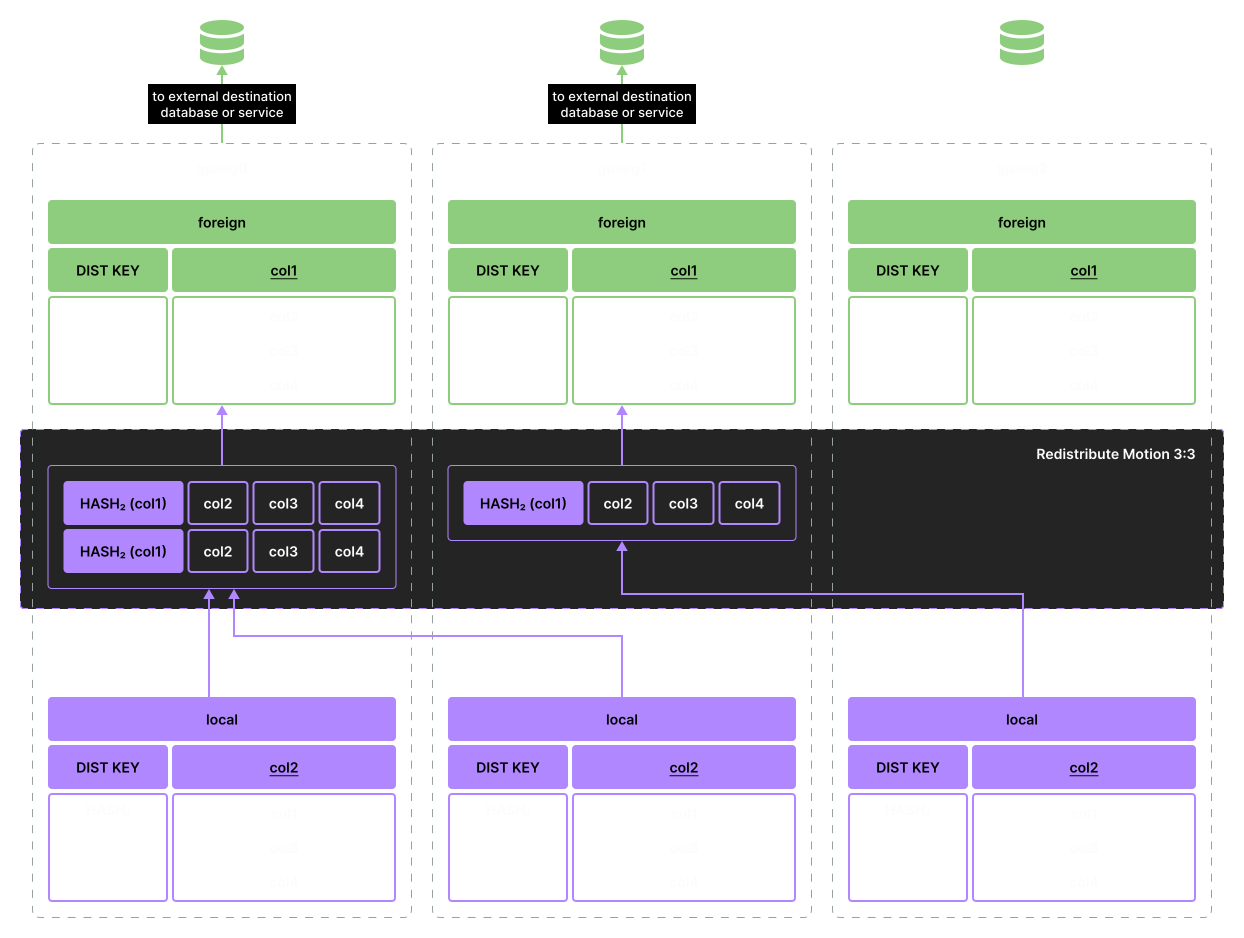
Data insertion example 1
The query plan in this case looks like this:
                      QUERY PLAN
------------------------------------------------------
 Insert on public.ft
   ->  Redistribute Motion 3:3  (slice1; segments: 3)
         Output: local.col1, local.col2, local.col3
         Hash Key: ft.col1
         ->  Seq Scan on public.local
               Output: local.col1, local.col2, local.col3
 Optimizer: Postgres query optimizer
(7 rows)-
Note that here for the node redistributing rows between segments (
Redistribute Motion), an intermediate grouping is applied on the fieldft.col1.
When the keys match (distribution of the foreign table changes to ft.c2):
postgres=# ALTER FOREIGN TABLE ft ALTER COLUMN col1 OPTIONS (SET insert_dist_by_key 'false');
ALTER FOREIGN TABLE

postgres=# ALTER FOREIGN TABLE ft ALTER COLUMN col2 OPTIONS (SET insert_dist_by_key 'true');
ALTER FOREIGN TABLE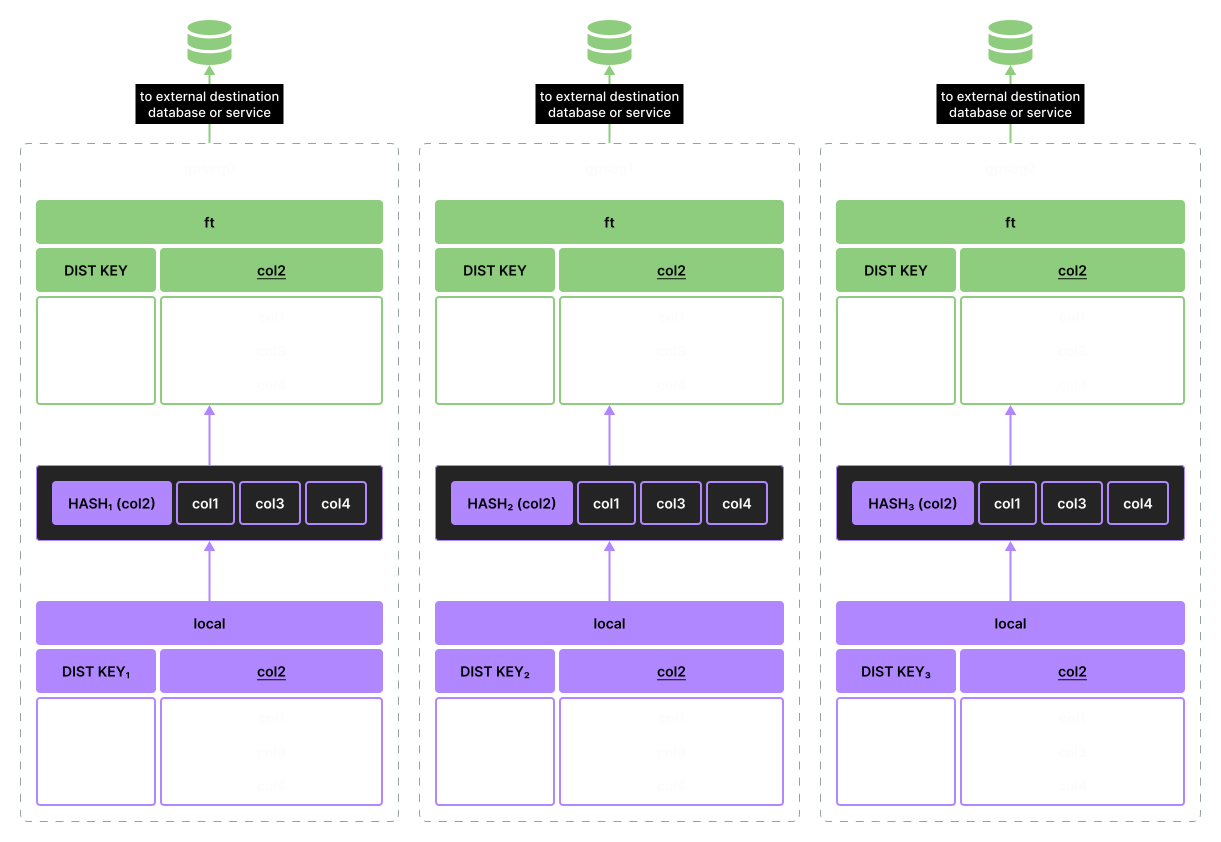
Data insertion example 2
For this configuration of distribution columns the plan becomes:
             QUERY PLAN
-------------------------------------
 Insert on public.ft
   ->  Seq Scan on public.local
         Output: local.c1, local.c2, local.c3
 Optimizer: Postgres query optimizer
(4 rows)
If the new settings are absent, the plans are built as before:
postgres=# ALTER FOREIGN TABLE ft ALTER COLUMN col2 OPTIONS (DROP insert_dist_by_key);
ALTER FOREIGN TABLE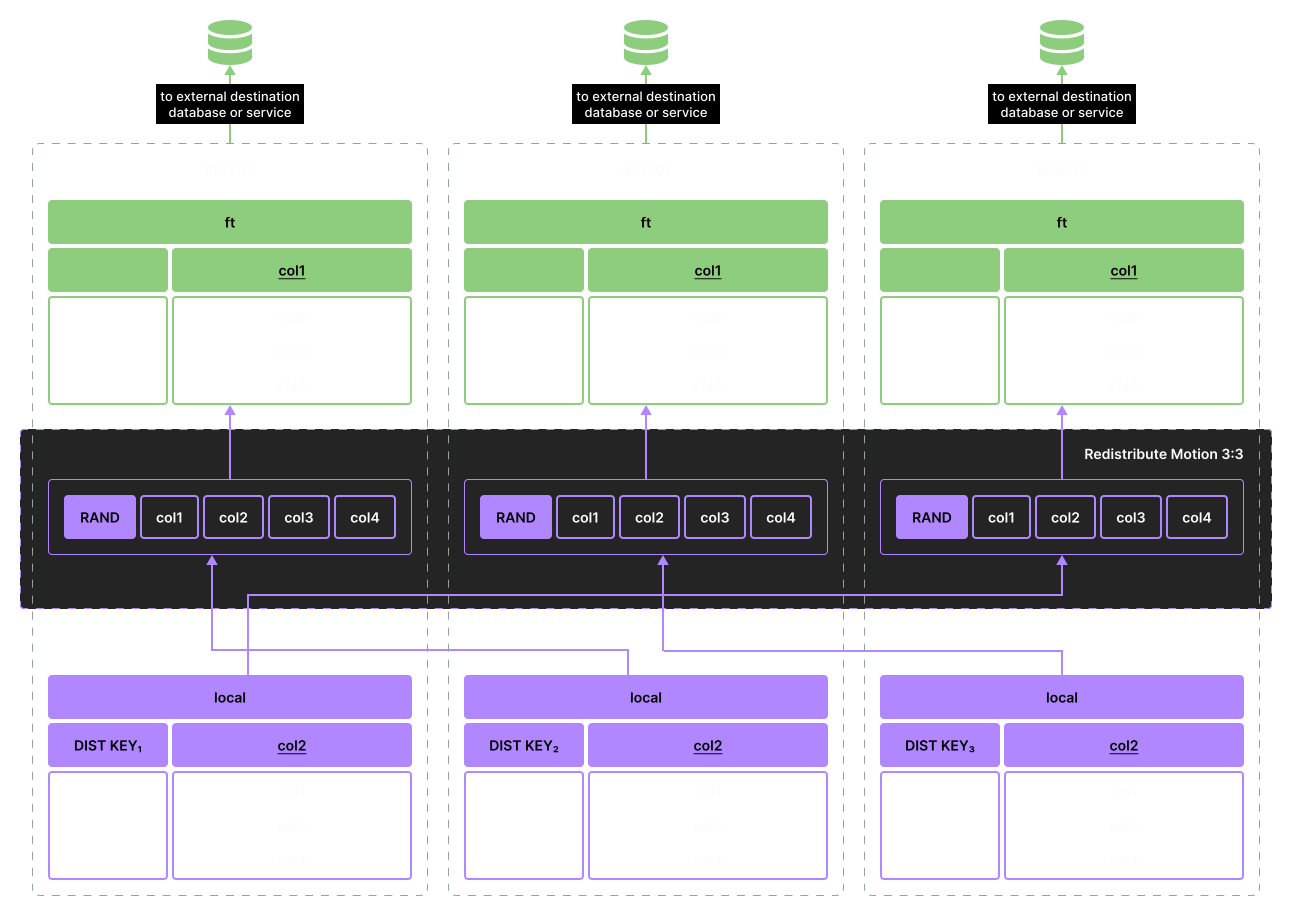
Data insertion example 3
postgres=# EXPLAIN (COSTS off, VERBOSE on) INSERT INTO ft SELECT * FROM t;
                      QUERY PLAN
------------------------------------------------------
 Insert on public.ft
   ->  Redistribute Motion 3:3  (slice1; segments: 3)
         Output: local.col1, local.col2, local.col3
         ->  Seq Scan on public.local
               Output: local.col1, local.col2, local.col3
 Optimizer: Postgres query optimizer
(6 rows)
Implementation notes:
-
The required distribution policy of the query is built "on the fly" — the planner considers the specified set of distribution columns when building the plan.
-
If the user-selected columns do not allow distribution according to the type restrictions for columns used in
DISTRIBUTED BYfor regular tables, then the planner informs the user with aWARNING, and then uses the default policy returned bycreateRandomPartitionedPolicy. -
If there are no distribution columns specified, then
createRandomPartitionedPolicyis used. -
If a value other than
mpp_execute 'all segments'is used, then the plan (if collecting data from segments is required) remains the same as if distribution column options were not specified (i.e. in generalGather Motionis used and the specified distribution options are not considered).
In the next section, we will see how these options affect insert operations into external sources using the example of the Iceberg connector.
Integration with Apache Iceberg
In this article, I will remind you the basic concepts of the Iceberg table format, which will be necessary for understanding the specifics of the Greengage-Iceberg connector implementation.
The following aspects and key Apache Iceberg features are important to us:
-
Some of the table metadata (namespaces, mapping of tables to their metadata in the form of files) is managed by a service called a catalog. There are various catalog implementations: Hive Metastore (HiveCatalog), RESTCatalog, JdbcCatalog, HadoopTables, HadoopCatalog and a number of custom ones, that implement the corresponding interfaces. Catalog is also responsilbe for the DDL operations, but in the case of read-write connectors (that interact with existing tables), scenarios of table creation/deletion, as well as any other service operations, are out-of-scope.
-
Table data can be stored in Parquet, Avro, and ORC files.
-
Among the basic concepts of the format:
-
Table snapshot — the state of the table at a specific point in time. If in the case of PostgreSQL/Greengage the snapshot concept is primarily associated with the idea of row visibility and closely tied to transaction identifiers (i.e. it’s mostly a runtime characteristic), then a snapshot of an Iceberg table defines which data files will be used when querying for the required snapshot (recent or a historical one). What can be extremely important when writing connectors, especially in a distributed environment — every row inserted into an Iceberg table creates a new snapshot, which is stored as a new table metadata file (together with previous snapshots). The catalog references the newest metadata file, which in turn stores the log (list) of snapshots.
-
The manifest file list represents a set of manifest files that make up a specific table snapshot and the metadata associated with these files, including partition specs.
-
A manifest file in turn contains information about specific files belonging to the snapshot. In addition to the path to the data file, it also stores metadata used for optimizing read queries (statistics, partition transform mechanism, more on this later).
-
-
A distinguishing feature of Iceberg partitioning from, for example, Hive partitioning lies in the implementation of partition schemas (specifications) at the metadata level in accordance with so-called hidden partitioning, when partition management is carried out at the logical level (table metadata) without binding to the physical storage structure (directory structure, as done for example by Apache Hive or Apache Impala).
-
The partition specification describes how to split tables into partitions. The main elements of this description are a column and a transform. If a column is a familiar concept in the world of PostgreSQL/Greengage, then the transform concept requires explanation. A transform describes how to extract the partition value — the value that leads us to the specific set of files making up a partition from the source column value. For example, the transform for
monthextracts the month number from theevent_tscolumn value:{ "spec-id": 1, "fields": [ { "source-id": 1, "field-id": 1000, "name": "event_ts_month", "transform": "month" } ] }
-
-
This format supports row deletion (including
UPDATEstatements), but since Parquet and similar formats are immutable, these operations are implemented either through separate delete files (starting from version 2, the Merge-on-read approach) or through Copy-on-write, which leads to rewriting files with the new changes and may cause problems under frequent updates. In the first case, a connector must know how to deal with the delete files.
Iceberg has a number of other interesting features — time-travel queries, branches, and tags — all of these are based on snapshots (in the case of branches and tags — named snapshots with their own lifecycle). Users are interested in this and the connector must provide means to work with such scenarios.
As we progress with the development of the corresponding connector, we plan to share updates on the current progress, but some aspects can already be revealed.
First, we should highlight which capabilities are provided to developers by the native Iceberg Java implementation. Second, reveal some aspects of a possible PXF connector implementation. Third, illustrate how foreign table distribution insert feature helps the Iceberg connector.
SELECT from Iceberg
One of the key elements of the Java implementation from the point of view of organizing data selection (SELECT-queries) is the TableScan class. This class allows delegating to Iceberg the "planning" of query execution in terms of row pre-filtering, selecting individual columns, passing partitioning parameters.
Thus, knowing the filtering parameters, and having at hand the list of columns we are interested in, we can do, for example, this:
TableScan scan = table.newScan();

TableScan filteredScan = scan
        .filter(Expressions.lessThan("event_id", 1000))
        .select("event_id", "event_ts", "subsystem_id", "event_details");

scan.select();

CloseableIterable<FileScanTask> filesToScan = scan.planFiles();
Essentially, on the last line we will have at our disposal a list of file paths (in our case on HDFS) that need to be read to return the data requested by the user.
If we look at the contents of filesToScan under Parquet-file storage on HDFS, the result will be:
hdfs://hdfs-node1:20500/test-warehouse/ggdb.db/events_ice/data/subsystem_id=101/event_ts_day=2026-01-20/9f477aec1d8dd71c-fed0ba8600000000_1498292252_data.0.parq

hdfs://hdfs-node1:20500/test-warehouse/ggdb.db/events_ice/data/subsystem_id=110/event_ts_day=2025-12-20/b641d716435f6be4-7fd42c1400000000_1600164749_data.0.parq

hdfs://hdfs-node1:20500/test-warehouse/ggdb.db/events_ice/data/event_ts_month=2025-09/subsystem_id=110/bd4e94ee19f89fe5-
ddfbdc8700000000_782720467_data.0.parq

hdfs://hdfs-node1:20500/test-warehouse/ggdb.db/events_ice/data/event_ts_month=2025-10/subsystem_id=101/d640261450465339-6fc6d78b00000000_1549314526_data.0.parq

hdfs://hdfs-node1:20500/test-warehouse/ggdb.db/events_ice/data/event_ts_month=2025-11/subsystem_id=100/a1485ebd281a0665-b003f13700000000_458826306_data.0.parq
Of course, in this case, we are not talking about full filtering of records according to the specified filter (unless it is a column included in the partition spec). A specific physical file may include other records as well, e.g. falling under min-max or dictionary filtering based on statistics and other table metadata. The SQL engine must in any case perform additional filtering of retrieved tuples, but reducing the number of "unnecessary" files for the executing query may be significant.
The next problem that needs to be solved is to distribute processing of these files among workers, but how to do this? PXF provides only the interface for distributing "tasks" (fragments) across workers (Fragmenter interface), but every fragment may be represtened as a whole file or a split of the file (so there will be zero to N fragments for every file depending of the file size).
The choice of a specific splitting strategy may depend on the query plan — number of files to read, file size, number of workers, etc. It is possible that in some cases a combination of splitting strategies could be used.
INSERT into Iceberg
The second interesting aspect is the method of organizing writes, where an important element is the partition specification mentioned earlier. Again, within this article we will consider only the issues that interest us — writing rows into partitioned Iceberg tables, which must be supported by a bidirectional connector.
Assume that the target table, into which we need to insert new records, has the following schema (in Apache Impala syntax):
[hdfs-node1:21050] ggdb> CREATE TABLE ggdb.events_ice (event_id INT, event_ts TIMESTAMP, event_details STRING, subsystem_id INT)
PARTITIONED BY SPEC (MONTH(event_ts), IDENTITY(subsystem_id))
STORED AS ICEBERG;
As we can see, on line 2 the partitioning schema is as follows: first comes the MONTH transform, which, as you can guess, extracts the month number from event_ts, followed by partitioning by some integer identifier (in this case, not by "hash of", but by the value itself).
If we look at the directory structure, we will see the following tree for some set of rows in the table distributed across two levels:
 |---events_ice
 |-----data
 |-------event_ts_month=2025-09
 |---------subsystem_id=110
 |-----------bd4e94ee19f89fe5-ddfbdc8700000000_782720467_data.0.parq
 |-------event_ts_month=2025-10
 |---------subsystem_id=101
 |-----------d640261450465339-6fc6d78b00000000_1549314526_data.0.parq
 |-------event_ts_month=2025-11
 |---------subsystem_id=100
 |-----------a1485ebd281a0665-b003f13700000000_458826306_data.0.parq
The partitioning spec can be changed. For example, we realized that the number of events drastically increased, so monthly partitioning no longer satisfies us, and we decided to use a daily parititioning. Let’s update the partitioning spec and examine what happened to the data:
[hdfs-node1:21050] ggdb> ALTER TABLE ggdb.events_ice SET PARTITION SPEC (DAY(event_ts), IDENTITY(subsystem_id));
Query: ALTER TABLE events_ice SET PARTITION SPEC (DAY(event_ts), IDENTITY(subsystem_id))
+-------------------------+
| summary                 |
+-------------------------+
| Updated partition spec. |
+-------------------------+

 |---events_ice
 |-----data
 |-------event_ts_month=2025-09
 |---------subsystem_id=110
 |-----------bd4e94ee19f89fe5-ddfbdc8700000000_782720467_data.0.parq
 |-------event_ts_month=2025-10
 |---------subsystem_id=101
 |-----------d640261450465339-6fc6d78b00000000_1549314526_data.0.parq
 |-------event_ts_month=2025-11
 |---------subsystem_id=100
 |-----------a1485ebd281a0665-b003f13700000000_458826306_data.0.parq
 |-------subsystem_id=101
 |---------event_ts_day=2026-01-20
 |-----------9f477aec1d8dd71c-fed0ba8600000000_1498292252_data.0.parq
 |-------subsystem_id=110
 |---------event_ts_day=2025-12-20
 |-----------b641d716435f6be4-7fd42c1400000000_1600164749_data.0.parq
Starting from 2026-01-20 (event_ts_day=2026-01-20), the folder structure changed and Iceberg now placed the subsystem_id field at the top partitioning level, and began extracting a calendar day from event_ts placing Parquet files in a daily partition level.
We can make the first obvious conclusion: from the write perspective, it’s simplier to delegate organizing physical storage structure to the Iceberg implementation (though writing directly to Parquet files is always an option, but much would have to be reinvented).
Which means does the base library offer us?
The library implements four write strategies, represented by the following classes:
-
FanoutWriter; -
PartitionedFanoutWriter; -
ClusteredDataWriter; -
PartitionedWriter.
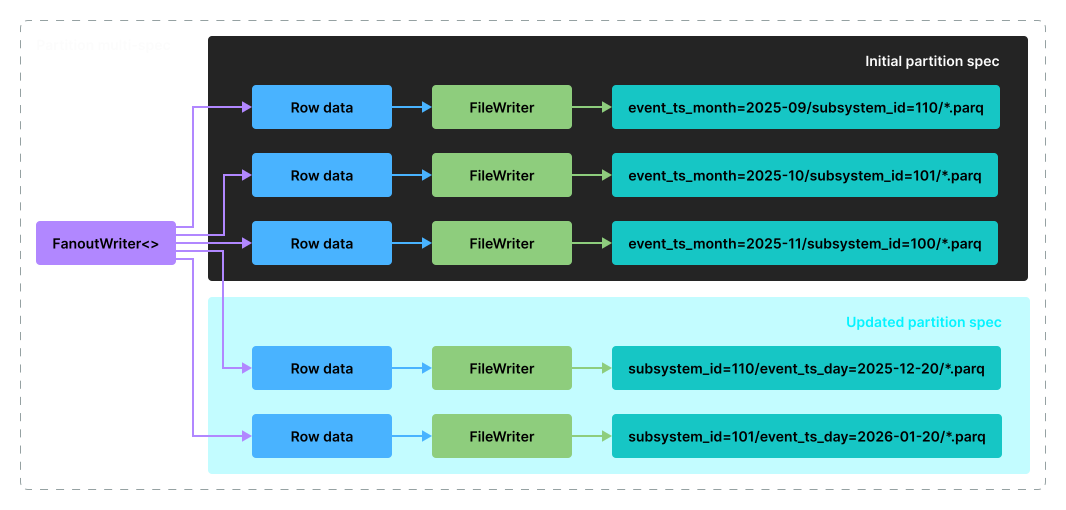
FanoutWriter strategy
This write strategy implies the presence of several writer classes for each partition specification (PartitionSpec). Scenarios of writing into tables with multiple specifications are supported. For example, if over time the user defines several schemas, this is called partition spec evolution.
For each combination of specifications a separate instance of the writer class is created during write. The write is parallelized.
As one might expect, in the case of heterogeneous data (rows falling into different partitions), this strategy comes with high overhead, since each instance consumes its own resources (for example, memory for buffers, etc.).
On the other hand, there is no need to pre-aggregate data with this strategy — FanoutWriter will distribute them among the required partitions on its own.
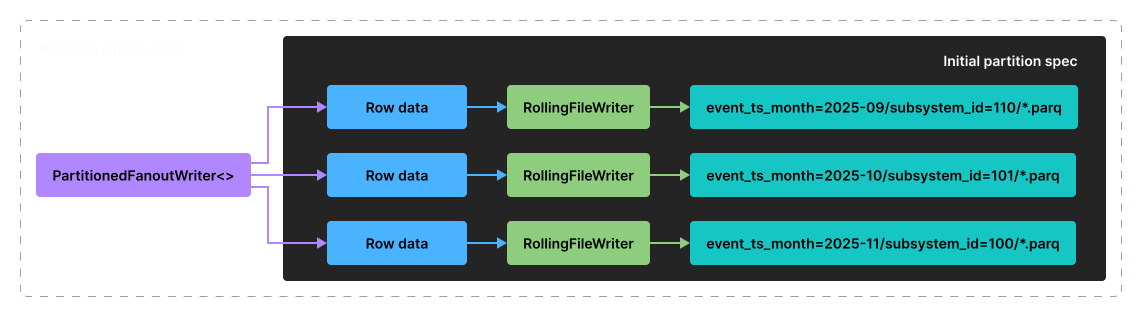
PartitionedFanoutWriter strategy
This strategy overlaps significantly with FanoutWriter, but unlike the latter, it does not support partition spec evolution. Only a fixed specification is supported with redirection into a writer instance based on a key represented by a PartitionKey instance.
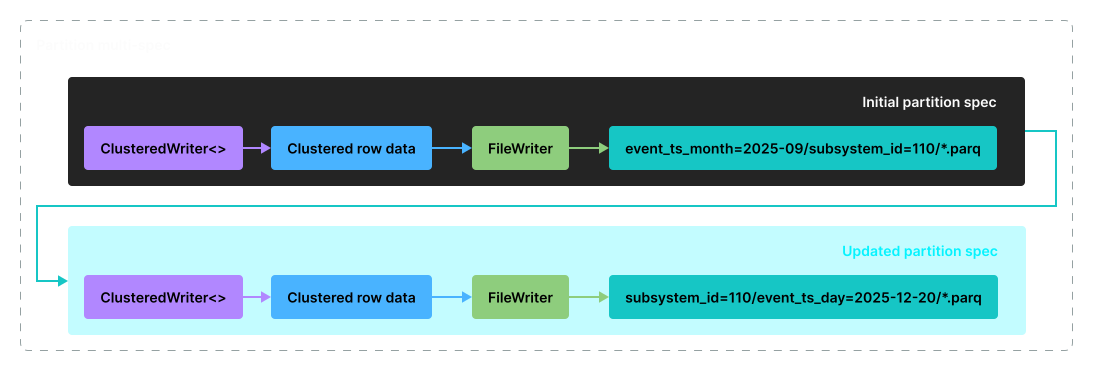
ClusteredDataWriter strategy
ClusteredWriter assumes that rows are grouped according to the partition specification, but supports multiple specifications. Otherwise (if rows are not grouped according to the specification), the insert ends with an error.
This strategy is suitable for pre-grouped rows, while for multiple specs, inserting "mixed" data is not supported — rows must be grouped by key(s) within each spec and inserted sequentially. It is characterized by efficient resource usage and high throughput.
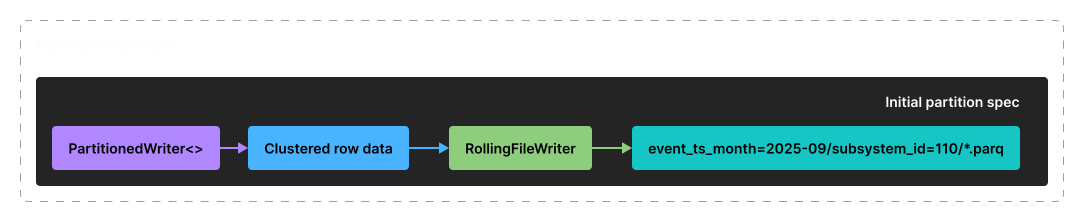
PartitionedWriter strategy
A precondition for using PartitionedWriter is that rows are grouped according to a single partition spec, which distinguishes it from ClusteredDataWriter.
Let’s return from write strategies to folders structure and, more precisely, to partition transform(s).
The second conclusion is based on the fact that at the moment, Greengage has no way to model Iceberg transforms as is.
The conclusion is that in general case, Greengage can assist classes, responsible for writing rows into Iceberg tables, but transparently preparing data that would be inserted as is (without re-partitioning) appears currently impossible.
This is where the above-mentioned feature of distributed insert into foreign tables helps us. Redistribute Motion can, in the case of transforms such as IDENTITY, group rows by the needed key (essentially, by column value), thereby helping the PartitionedFanoutWriter class by ensuring that the input rows arrives already grouped. As a result, this can yield a noticeably smaller number of files.
Let’s illustrate this, but first create a table with only the IDENTITY transform:
[hdfs-node1:21050] ggdb> CREATE TABLE events_ice (event_id INT, event_ts TIMESTAMP, event_details STRING, subsystem_id INT)
PARTITIONED BY SPEC (IDENTITY(subsystem_id))
STORED AS ICEBERG;
First, we declare tables on the Greengage side without considering the Iceberg-side partition spec:
postgres=# CREATE FOREIGN TABLE events_ice_ft(event_id INT,  event_ts TIMESTAMP WITH TIME ZONE, event_details TEXT, subsystem_id INT)
SERVER iceberg_server OPTIONS (
    catalog_impl 'org.apache.iceberg.hive.HiveCatalog',
    catalog_uri 'thrift://hdfs-node1:9083',
    warehouse_location '/test-warehouse',
    resource 'ggdb.events_ice'
);

postgres=# CREATE TABLE events_ice_local (event_id INT,  event_ts TIMESTAMP WITH TIME ZONE, event_details TEXT, subsystem_id INT) DISTRIBUTED BY (event_id);
CREATE TABLE
postgres=# EXPLAIN (COSTS OFF) INSERT INTO events_ice_ft SELECT * FROM events_ice_local;
             QUERY PLAN
------------------------------------
 Insert on events_ice_ft
   ->  Seq Scan on events_ice_local
 Optimizer: Postgres-based planner
(3 rows)
If we look at the plan, specifically at lines marked with 1 and 2, we can see insertion from each segment directly, but the insert will not account for the expected distribution on the Iceberg side.
Let’s insert 1 million rows from 8 segments, where the subsystem_id column contains 4 unique values. What do we have in HDFS after the insert?
 |---events_ice
 |-----data
 |-------subsystem_id=1
 |---------00000-1-cb022581-f5f5-461f-b766-8f62e75224e7-00001.parquet
 |---------00001-1-94117a7e-854a-401c-baa9-0dd17a4f7a89-00001.parquet
 |---------00002-1-8647f759-d531-44d6-b937-056d6e482200-00001.parquet
 |---------00003-1-f6401bed-7246-4f64-99ea-56afd6551f13-00001.parquet
 |---------00004-1-1740b692-39f0-4c29-bf17-34bbec3b0a92-00001.parquet
 |---------00005-1-f99657e1-165f-4eb1-8e9d-e8e3a67db0c1-00001.parquet
 |---------00006-1-50444f2c-b7ef-4f38-ac30-c8ad16c36939-00001.parquet
 |---------00007-1-86be9734-dd3e-4ade-9c59-0214eff6c549-00001.parquet
 |-------subsystem_id=2
 |---------00000-1-cb022581-f5f5-461f-b766-8f62e75224e7-00002.parquet
 |---------00001-1-94117a7e-854a-401c-baa9-0dd17a4f7a89-00002.parquet
 |---------00002-1-8647f759-d531-44d6-b937-056d6e482200-00002.parquet
 |---------00003-1-f6401bed-7246-4f64-99ea-56afd6551f13-00002.parquet
 |---------00004-1-1740b692-39f0-4c29-bf17-34bbec3b0a92-00002.parquet
 |---------00005-1-f99657e1-165f-4eb1-8e9d-e8e3a67db0c1-00002.parquet
 |---------00006-1-50444f2c-b7ef-4f38-ac30-c8ad16c36939-00002.parquet
 |---------00007-1-86be9734-dd3e-4ade-9c59-0214eff6c549-00002.parquet
 |-------subsystem_id=3
 |---------00000-1-cb022581-f5f5-461f-b766-8f62e75224e7-00003.parquet
 |---------00001-1-94117a7e-854a-401c-baa9-0dd17a4f7a89-00003.parquet
 |---------00002-1-8647f759-d531-44d6-b937-056d6e482200-00003.parquet
 |---------00003-1-f6401bed-7246-4f64-99ea-56afd6551f13-00003.parquet
 |---------00004-1-1740b692-39f0-4c29-bf17-34bbec3b0a92-00003.parquet
 |---------00005-1-f99657e1-165f-4eb1-8e9d-e8e3a67db0c1-00003.parquet
 |---------00006-1-50444f2c-b7ef-4f38-ac30-c8ad16c36939-00003.parquet
 |---------00007-1-86be9734-dd3e-4ade-9c59-0214eff6c549-00003.parquet
 |-------subsystem_id=4
 |---------00000-1-cb022581-f5f5-461f-b766-8f62e75224e7-00004.parquet
 |---------00001-1-94117a7e-854a-401c-baa9-0dd17a4f7a89-00004.parquet
 |---------00002-1-8647f759-d531-44d6-b937-056d6e482200-00004.parquet
 |---------00003-1-f6401bed-7246-4f64-99ea-56afd6551f13-00004.parquet
 |---------00004-1-1740b692-39f0-4c29-bf17-34bbec3b0a92-00004.parquet
 |---------00005-1-f99657e1-165f-4eb1-8e9d-e8e3a67db0c1-00004.parquet
 |---------00006-1-50444f2c-b7ef-4f38-ac30-c8ad16c36939-00004.parquet
 |---------00007-1-86be9734-dd3e-4ade-9c59-0214eff6c549-00004.parquet
For each Parquet file, the five-digit prefix from 00000 to 00007 indicates the segment number (the content field) that performed the insert. You can see that for each partition all 8 segments performed its write.
Let’s truncate the target table, change the distribution settings for the foreign table and repeat the insert:
postgres=# ALTER FOREIGN TABLE events_ice_ft ALTER COLUMN subsystem_id OPTIONS (ADD insert_dist_by_key 'true');
ALTER FOREIGN TABLE

postgres=# EXPLAIN (COSTS OFF) INSERT INTO events_ice_ft SELECT * FROM events_ice_local;
                      QUERY PLAN
------------------------------------------------------
 Insert on events_ice_ft
   ->  Redistribute Motion 8:8  (slice1; segments: 8)
         Hash Key: events_ice_local.subsystem_id
         ->  Seq Scan on events_ice_local
 Optimizer: Postgres-based planner
(5 rows)
How did the situation on HDFS change:
 |---events_ice
 |-----data
 |-------subsystem_id=1
 |---------00004-1-58954502-1c91-457a-b7bb-2c945e8229c1-00001.parquet
 |-------subsystem_id=2
 |---------00003-1-bf3cf4e5-7507-4f3e-ac0e-52f9932ba495-00001.parquet
 |-------subsystem_id=3
 |---------00007-1-5c2ba531-77a9-4240-b639-37522eaefb37-00001.parquet
 |-------subsystem_id=4
 |---------00000-1-dd1445b5-d5d8-4d04-9248-ff70cfa490fb-00001.parquet
So, in the case of read scenario, fewer files will have to be read, therefore scans in general will perform faster. Yes, there is some overhead on the Redistribute Motion node, but the benefit of pre-aggregation seems to outweigh the redistribution cost.
NOTE
In the future, as the connector development progresses and load testing is performed, we will share with you the results of comparative tests.
However, "computational" transforms (get year/month/day from timestamp, truncate column value, etc.) of Iceberg partition specifications couldn’t be implemented as is right now. A possible option of such transforms is extending the list of foreign table parameters with transform functions, but it’s an area for future implementation.
One of the important questions for the inserts is how to implement distributed commit of the insert.
As mentioned before, each insert generates a new data file, a new snapshot, new metadata files. For example, three inserts will give us the following set of entities.
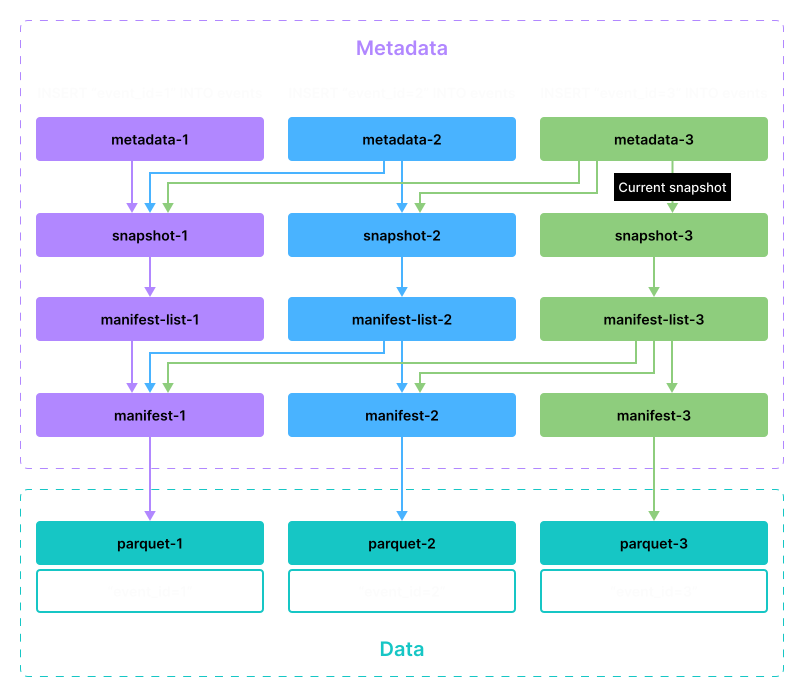
Result of the insert operation
If we imagine that the cluster has hundreds of segments, as on large clusters, then the number of snapshots will depend on the number of segments (assuming each got its own rows to insert). The more such inserts, the more snapshots will be in the metadata file’s list, which will lead to metadata bloat and may cause problems later.
For example, for the query without intermediate grouping by events_ice_local.subsystem_id, 8 new snapshots will be created during the insert (initially the table was empty):
[hdfs-node1:21050] ggdb> SELECT snapshot_id, committed_at, operation, parent_id FROM events_ice.snapshots;
+---------------------+-------------------------------+-----------+---------------------+
| snapshot_id         | committed_at                  | operation | parent_id           |
+---------------------+-------------------------------+-----------+---------------------+
| 6936299145864004987 | 2025-11-22 16:29:58.197000000 | append    | NULL                |
| 4635881949092382796 | 2025-11-22 16:29:58.788000000 | append    | 6936299145864004987 |
| 6620167082491361265 | 2025-11-22 16:29:59.370000000 | append    | 4635881949092382796 |
| 9127144169729220665 | 2025-11-22 16:29:59.793000000 | append    | 6620167082491361265 |
| 2335157739194732622 | 2025-11-22 16:30:00.214000000 | append    | 9127144169729220665 |
| 7107683723762847370 | 2025-11-22 16:30:00.554000000 | append    | 2335157739194732622 |
| 8876670218399049190 | 2025-11-22 16:30:00.933000000 | append    | 7107683723762847370 |
| 7213472037626658727 | 2025-11-22 16:30:01.198000000 | append    | 8876670218399049190 |
+---------------------+-------------------------------+-----------+---------------------+
Second, an unpleasant moment is visibility of individual snapshots as some segments finish the insert and others are still in progress. The Iceberg architecture, largely based on snapshots and its metadata, implies the ability to see different snapshots (time travel queries as an example), but in this case such partial insert along with snapshot creation for each load may not be exactly what the user expects.
Let’s add an artificial delay for one of the segments during insert. The remaining seven segments will finish earlier. At some point we may see not 1 million rows, but fewer:
[hdfs-node1:21050] ggdb> SELECT snapshot_id, committed_at, operation, parent_id FROM ggdb.events_ice.snapshots;
+---------------------+-------------------------------+-----------+---------------------+
| snapshot_id         | committed_at                  | operation | parent_id           |
+---------------------+-------------------------------+-----------+---------------------+
| 7768755069134084319 | 2025-11-22 16:40:05.673000000 | append    | NULL                |
| 1280842592617033420 | 2025-11-22 16:40:06.563000000 | append    | 7768755069134084319 |
| 3036780713488633888 | 2025-11-22 16:40:07.693000000 | append    | 1280842592617033420 |
| 1477877215760239613 | 2025-11-22 16:40:07.944000000 | append    | 3036780713488633888 |
| 1377726043692182832 | 2025-11-22 16:40:08.324000000 | append    | 1477877215760239613 |
| 8464938146211865619 | 2025-11-22 16:40:08.596000000 | append    | 1377726043692182832 |
| 662259372451030286  | 2025-11-22 16:40:09.017000000 | append    | 8464938146211865619 |
+---------------------+-------------------------------+-----------+---------------------+
Fetched 7 row(s) in 0.15s

[hdfs-node1:21050] ggdb> SELECT COUNT(*) FROM ggdb.events_ice;
+----------+
| count(*) |
+----------+
| 874576   |
+----------+
Fetched 1 row(s) in 0.11s
The connector, in order to preserve atomicity of the insert, must handle this problem as well. And possibly, not without the help from PXF itself…
I propose to conclude today’s overview of what has already been released in the latest Greengage release and what is actively being developed for inclusion in one of the upcoming releases.
Stay tuned, we will be back soon!