GREENGAGE BACKUP
Greengage DB backup and recovery. Part 3
06.10.2026
In this article, we look at advanced Greengage DB restore scenarios that go beyond restoring a cluster to its original hosts and segments

Dmitry Voronkov
Software Architect

Contents
Data, identity, and behavior
In the first article, we described an approach to creating a physical backup of a Greengage cluster and restoring from it. We also introduced a prototype utility (ggbm) that implements this approach.
In the second article, we moved from ideal conditions to real-world practice: handling interrupted backups, deleting backups without losing the restore points that depend on them, and managing cluster topology changes between backup and restore.
So far, we have assumed that the cluster is restored to its original hosts and segments. In this article, we no longer make that assumption. Without it, three scenarios that seem unrelated turn out to be three aspects of the same problem:
-
how configuration changes affect existing backups;
-
restoring primary and mirror segments in parallel;
-
restoring one cluster from a backup of another cluster.
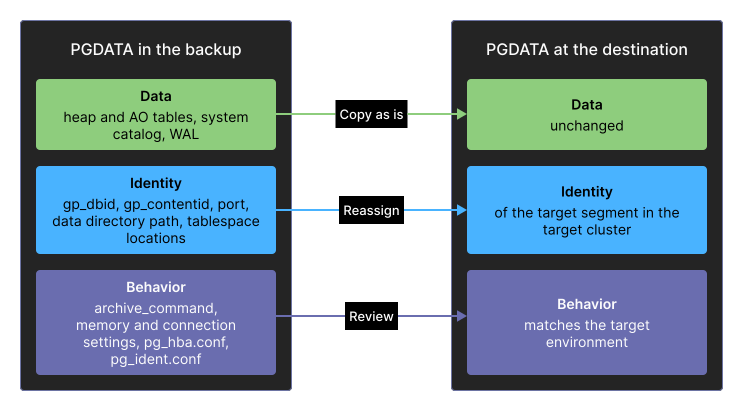
The key observation is that a segment’s PGDATA directory holds three kinds of information, but we created the backup to preserve only the first kind:
-
Data — files that store heap and append-optimized tables, the system catalog, and WAL. This is the actual database data, and it is the same for a primary segment and its mirror.
-
Identity — which segment and cluster this instance belongs to:
gp_dbid,gp_contentid, the port, the data directory path, and tablespace locations. This is what distinguishes one instance from another. -
Behavior — how the instance operates and who can interact with it:
archive_command, memory and connection settings, pg_hba.conf, and pg_ident.conf. These settings are inherited from the backup source, whether or not they are appropriate for the destination.
A correct restore must keep the data unchanged, assign the identity required by the target cluster, and review the behavior settings rather than copy them without checking. Everything else in this article follows from this.
Kinds of data in a backup
How configuration changes affect existing backups
Let’s start with the configuration itself. In the first article, we listed the files to exclude from a backup to avoid problems during PostgreSQL recovery. Now we need a second list: files that are restored from the backup and need to be checked and adjusted afterward.
Files that matter
| File | Contents | Required action |
|---|---|---|
postgresql.conf |
|
Reassign |
internal.auto.conf |
A single line, |
Set |
postgresql.auto.conf |
Settings applied with |
Remove the recovery parameters once recovery completes |
recovery.conf (Greengage 6) |
|
Created during the restore; must become recovery.done when recovery completes |
standby.signal / recovery.signal (Greengage 7) |
The presence of either file puts the instance into recovery mode |
Removed after recovery |
pg_hba.conf |
Connection and replication permissions for the addresses of a specific primary segment and its mirror |
Regenerate for the target pair |
pg_ident.conf |
Mapping between OS users and database users |
Must match the OS users on the target hosts |
Two items on this list deserve a closer look.
gp_dbid and gp_contentid identify a cluster segment
These two settings are what turn a directory of files into a specific segment.
gp_contentid identifies the part of the distributed data that the instance holds.
gp_dbid identifies the physical instance itself.
A primary segment and its mirror share the same gp_contentid value but have different gp_dbid values, which is exactly what sets them apart.
gp_contentid is stored in postgresql.conf, while gp_dbid is stored in a separate file:
$ cat /data1/primary/gpseg0/internal.auto.conf
gp_dbid=2
In Greengage, the on-disk path of a user tablespace includes the gp_dbid:
<tablespace_location>/<gp_dbid>/GPDB_<major>_<catalog_version>/<dboid>/<relfilenode>
The gp_dbid is part of the path so that several segments on one host can share a tablespace location without conflicts.
As a result, editing internal.auto.conf is only one step in reassigning gp_dbid. The tablespace directories must also be moved to a subdirectory named after the new gp_dbid. The symbolic links in pg_tblspc/ must then be updated to point to those directories.
The rule is simple: when the gp_dbid changes, the tablespace layout changes with it.
Any restore that assigns a different gp_dbid to a segment must also update its tablespace paths.
If the cluster has no user tablespaces, this step is unnecessary.
pg_hba.conf depends on host addresses
A segment’s pg_hba.conf is specific to its primary and mirror pair: it is generated with the addresses of both instances. Greengage writes these entries itself when mirrors are added or recovered, and they look like this:
host replication gpadmin samehost trust
host all         gpadmin 192.168.1.12/32 trust
host replication gpadmin 192.168.1.12/32 trust
host replication gpadmin 192.168.1.11/32 trust
The primary and mirror addresses are recorded as they were when the file was written.
If you restore this PGDATA on another host or pair the restored segment with a different mirror, the connection rules in the file no longer match the environment.
The segment starts (its data is intact), but replication connections are rejected because the new mirror’s address is not on the list.
The mappings in pg_ident.conf can fail for a similar reason. If the target hosts use a different OS user, the mappings no longer apply, and you cannot connect to the database.
The fix is either to save the target cluster’s versions of these files before the restore and reuse them afterward or to regenerate them for the target topology as part of the restore. This is exactly what gprecoverseg and gpaddmirrors do for the segments they manage.
Proxy configuration
Because the backup includes the configuration, there is also a less obvious side effect.
One example is the interconnect network protocol, set with gp_interconnect_type.
If this parameter is set to proxy, segments communicate over the interconnect using the addresses in gp_interconnect_proxy_addresses.
This setting contains IP addresses or hostnames from the original cluster. As a result, a distributed query on the restored cluster appears to hang. The master cannot reach the segments because it is trying to connect to addresses from the original cluster.
One way to fix this is to start only the master and use utility mode to change gp_interconnect_proxy_addresses to match the target cluster’s topology. Then start the rest of the cluster.
A simpler option is to switch the interconnect type to udpifc in utility mode and set gp_interconnect_proxy_addresses to an empty string.
Restoring primary and mirror segments in parallel
The restore procedure from the first article starts by restoring the master and each primary segment from the repository. We then start the cluster and run:
$ gprecoverseg -aFThis last step performs a full recovery of every mirror by running pg_basebackup against its primary segment.
For each primary segment, the full data set has already been read from the repository during the restore. The primary now reads the same data again and sends it over the network a second time to build the mirror.
Mirror recovery cannot start until the primary segments have been restored, so the two phases run sequentially.
On a large cluster, this noticeably increases the RTO (recovery time objective) and puts extra load on primary segments that have just started.
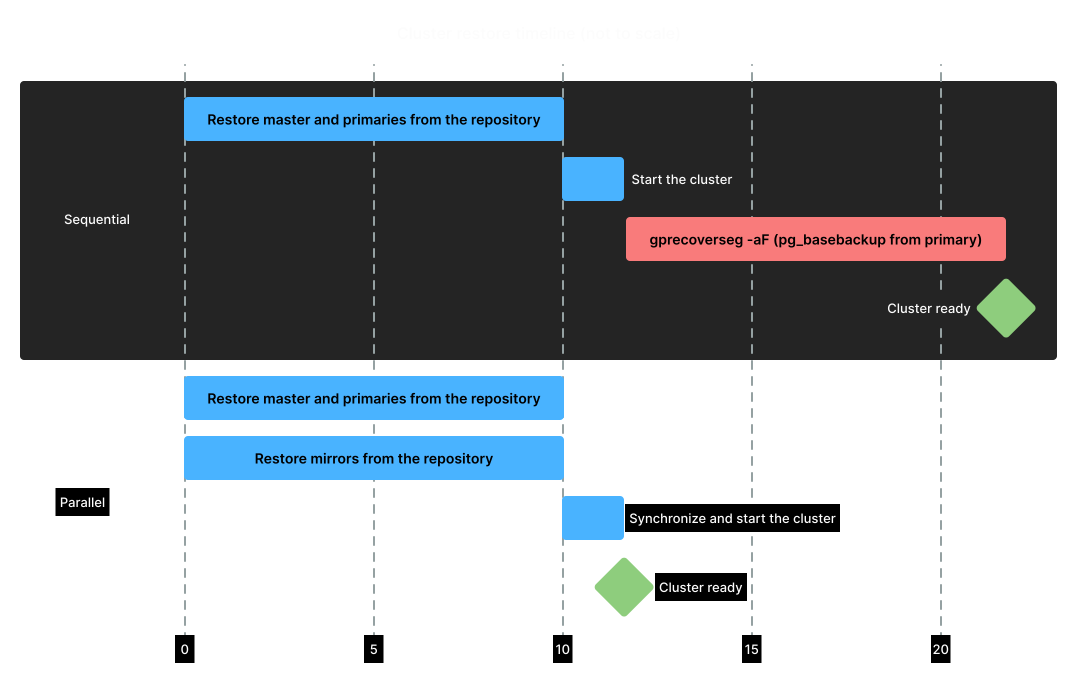
Sequential vs. parallel mirror restore
The idea
A mirror’s data is byte-for-byte identical to its primary segment’s data. We already have all of that data in the repository. So instead of restoring the primary segment and then cloning it, we restore the primary segment and its mirror from the same backup set at the same time. Each segment instance, primary or mirror, then becomes an independent restore task.
The two restored instances should differ only in the identity settings described above:
| Primary | Mirror | |
|---|---|---|
gp_contentid |
0 |
0 (same) |
gp_dbid |
2 |
5 |
port |
10000 |
10500 |
Data directory |
/data1/primary/gpseg0 |
/data1/mirror/gpseg0 |
Tablespace subdirectory |
<location>/2/… |
<location>/5/… |
pg_hba.conf |
Entries for the pair |
Entries for the pair |
In other words, restoring a mirror from the same backup set as its primary is perfectly valid.
Synchronization
Restoring the data from the backup is relatively straightforward. The more interesting part is what happens when the primary segment is promoted.
Both copies (primary and mirror) replay WAL up to the same restore point, so at that moment they are identical. The mirror no longer needs a base backup from the primary because it has already replayed WAL to the same position. It only needs to connect to the primary for replication. Two points need a closer look.
Timeline switch. When the primary segment finishes point-in-time recovery and is promoted, it increments its timeline number. New WAL is then written on timeline 2, while the mirror is still on timeline 1.
A replica does not switch to the new timeline automatically.
The mirror must be configured to follow the latest timeline. It must also be able to fetch the new timeline’s history file, either from the archive through restore_command or by streaming it from the promoted primary segment:
recovery_target_timeline = 'latest'The replication slot is dropped. On every primary segment, Greengage keeps a physical replication slot named internal_wal_replication_slot.
This slot keeps the primary segment from recycling WAL that its mirror has not yet received.
However, when a segment starts in archive recovery mode, Greengage drops this slot:
if (ArchiveRecoveryRequested)
    ReplicationSlotDropIfExists(INTERNAL_WAL_REPLICATION_SLOT_NAME);
After the restore, the primary segment has no slot to prevent it from recycling WAL that the mirror still needs. The slot must be recreated before the mirror connects:
$ PGOPTIONS='-c gp_session_role=utility' psql -p 10000 -d postgres \
  -c "SELECT pg_create_physical_replication_slot('internal_wal_replication_slot');"
The complete sequence is as follows:
-
Restore all primary segments and all mirrors from one backup set in parallel, giving each instance its own identity.
-
Replay WAL on all segments up to the same restore point. At this moment, each primary segment and its mirror are identical.
-
Write the full topology (primary segments and mirrors) to
gp_segment_configurationon the master, as described in the previous article. Set the mirrors' synchronization mode tos. -
Complete point-in-time recovery (PITR) on the primary segments to bring them to the
in productionstate. -
Recreate
internal_wal_replication_sloton every primary segment. -
Configure each mirror to connect to its primary segment (
primary_conninfo, the slot name,recovery_target_timeline='latest'). -
Restart the cluster.
When to use parallel restore
There is a trade-off to consider.
gprecoverseg -aF is the standard approach: it is a single command, and it is well tested.
The optimization described above involves a long sequence of steps, and each step must be completed correctly.
It is worth the complexity only when the data volume is large enough for the shorter restore time to matter.
It also requires thorough checks: match every dbid/content pair against the planned topology, check the local configuration, confirm the replication state, and so on.
Restoring one cluster from another cluster’s backup
The third scenario requires almost no new procedures. If you can reassign a segment’s identity, you can place the segment anywhere.
Prerequisites
First, check these three requirements:
-
The same number of primary segments. A physical backup contains one backup set per
contentvalue, and each set needs a corresponding target segment. A backup of a 16-segment cluster cannot be restored to an 8-segment cluster. -
Matching major and catalog versions. The catalog version must match because it is part of the tablespace directory name.
-
Read access to the repository from the target hosts, so they can read the data and WAL.
Mapping
The source topology is saved in the backup metadata, as described in the first article. We map it to the target topology by matching segments with the same content value:
| content | Source dbid → target dbid | Source host → target host | Target datadir | Target port |
|---|---|---|---|---|
-1 |
1 → 1 |
|
/data1/master/gpseg-1 |
5432 |
0 |
2 → 2 |
|
/data1/primary/gpseg0 |
10000 |
1 |
3 → 3 |
|
/data1/primary/gpseg1 |
10001 |
Then, for each segment, we restore the data from the source stanza seg<content> into the target data directory. We update gp_dbid, port, and the tablespace paths to match the target topology. We also regenerate pg_hba.conf and pg_ident.conf for the target hosts and disable the inherited archive_command.
Finally, we overwrite gp_segment_configuration on the target master with the target topology and start the cluster.
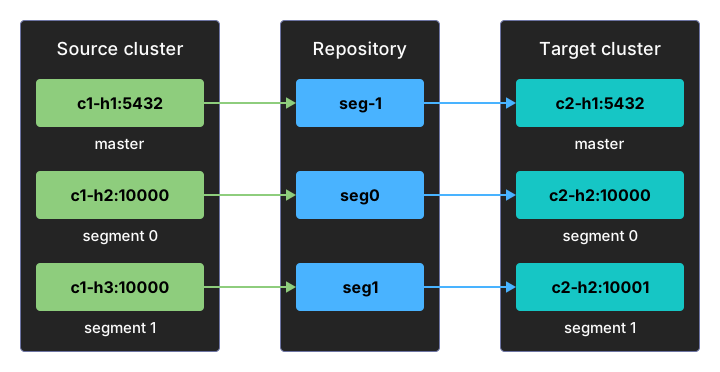
Restoring to different hosts
The archive_command trap
Now we come to what is probably the most important part. The restore problems covered so far have visible symptoms: if you do not fix them, the cluster either fails to restore or does not work as expected. This problem is different: if everything else is handled correctly, the cluster works normally, but WAL archiving is broken at best. This can affect both the cluster’s future operation and subsequent restores.
In our ggbm example, the restored segment’s postgresql.conf still contains the source cluster’s archive_command:
archive_command = 'PGOPTIONS="-c gp_session_role=utility" pgbackrest --stanza=seg%c archive-push %p'The stanza name comes from %c, the segment’s content ID, so it is correct on the target cluster.
However, the destination repository is determined by the pgbackrest.conf file specified by PGBACKREST_CONFIG on the target host.
If that file still refers to the source cluster’s repository, the restored cluster begins sending WAL to the source cluster’s stanza immediately after startup.
It is worth explaining why the usual pgbackrest check does not detect this problem.
It validates a stanza against the system identifier and version of the cluster writing to it.
A physical copy inherits both values from its source, so the check cannot distinguish the clone from the original cluster.
The safe sequence is:
-
Before starting the restored cluster for the first time, disable archiving: set
archive_mode=offor setarchive_commandto a stub command. -
Start the cluster and verify the restore.
-
Configure pgbackrest.conf to use the repository intended for the restored cluster and create its stanza. Only then re-enable archiving.
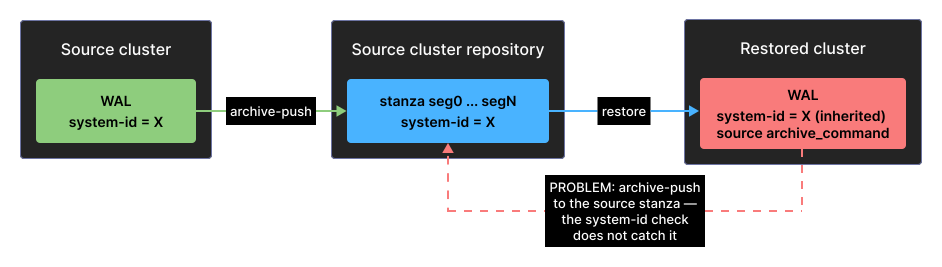
Shared WAL repository problem
A backup as a template
Once a backup can be restored into a different cluster, it is no longer just a disaster recovery tool. It becomes a tool for provisioning new clusters.
Keep one full backup and a named restore point as a reference image, and you can restore new clusters from it for many purposes: a staging environment with a realistic data volume, a cluster for a developer or a CI run that always starts from the same known state, a copy for analytics that you can discard and recreate as needed, a cluster for testing an upgrade on real data, or a migration to new hardware.
Compared with gpbackup/gprestore for the same task, the trade-off is clear.
A logical restore is portable: it supports a different number of segments and can work across cluster versions.
A physical restore requires matching segment counts and versions, but it parallelizes well and does not rebuild indexes or recompute statistics.
What to do after cloning
One more consideration concerns how the restored cluster is used rather than how the backup works: a physical copy of a production cluster includes both production data and production credentials. Roles and their passwords are copied unchanged, along with all catalog entries that reference external systems. Before giving anyone access to a clone, take at least these steps:
-
change the passwords of the inherited roles or disable them, and restrict pg_hba.conf on the clone to the people who need access;
-
check external table locations:
gpfdist://URLs, S3 endpoints, and PXF and foreign server definitions still point to the original endpoints, and writable external tables can write to them; -
check everything else that contains hostnames or credentials, including extensions.
Masking the data itself is a separate task that a physical backup does not perform. If the clone is intended for people who should not see production data, you need to mask the data after the restore and before granting them access.
Conclusion
Over these three articles, we have developed a structured approach to physical backups of a Greengage cluster, starting with the basic idea of copying PGDATA from every segment.
This final article explains how to think about the copy: PGDATA contains data, identity, and behavior. A correct restore must keep the data unchanged, assign the identity required by the target cluster, and review the behavior settings before applying them.
This distinction is what makes the other two scenarios possible. A mirror differs from its primary segment only in identity, so it can be restored from the primary’s backup. Both instances can replay WAL to the same restore point before the primary is promoted. This shortens the restore time by eliminating a separate sequential pass over the full data set. And because one cluster differs from another only in identity, a backup can serve as the basis for a new cluster, turning the backup system into a tool for provisioning environments. This requires careful and precise reassignment of each segment’s identity.