GREENGAGE SHRINK
ggrebalance: Part 1. Shrink
29.05.2026
This post covers Greengage DB cluster shrink using ggrebalance: utility architecture, the FSM approach, safe data redistribution via INSERT, comparison with CTAS, rollback support, and performance test results.

Alexander Kondakov
C Developer

Contents
Introduction
A Greengage DB cluster is not static. Data volumes grow and shrink, and parallelism level of workload processing often needs changes. Hardware gets replaced, and clusters are sometimes migrated to new infrastructure. Together, these changes lead to changes in cluster topology — the number of segments, their placement across hosts, and the mirroring strategy.
Greengage already ships with utilities for these tasks: gpexpand for cluster expansion, gpmovemirrors for physical mirror relocation, and others.
Running these tools by hand or through custom scripts in clusters with hundreds of segments is time-consuming and prone to error. It requires careful coordination when distributing data, removing segments from the cluster, and relocating mirrors.
Moreover, the standard utility set does not support cluster shrink operations or multidimensional topology changes with several steps such as reducing the number of segments, adding a new host, decommissioning an existing one, and changing the mirroring strategy.
In the context of shrink operations, it is also worth mentioning Cloudberry DB’s gpshrink, which is designed as a counterpart to the gpexpand utility.
However, its use needs to be handled carefully, as shrink operations can introduce irreversible changes to the cluster configuration.
The gaps in the functionality of the existing tools are addressed by the ggrebalance cluster utility, which is under active development.
ggrebalance offers a reliable way to handle Greengage cluster topology change scenarios. The utility includes error handling, is reentrant (allowing interrupted operations to resume), and enables reverting previously applied actions if necessary.
The current release of the utility covers the following scenarios:
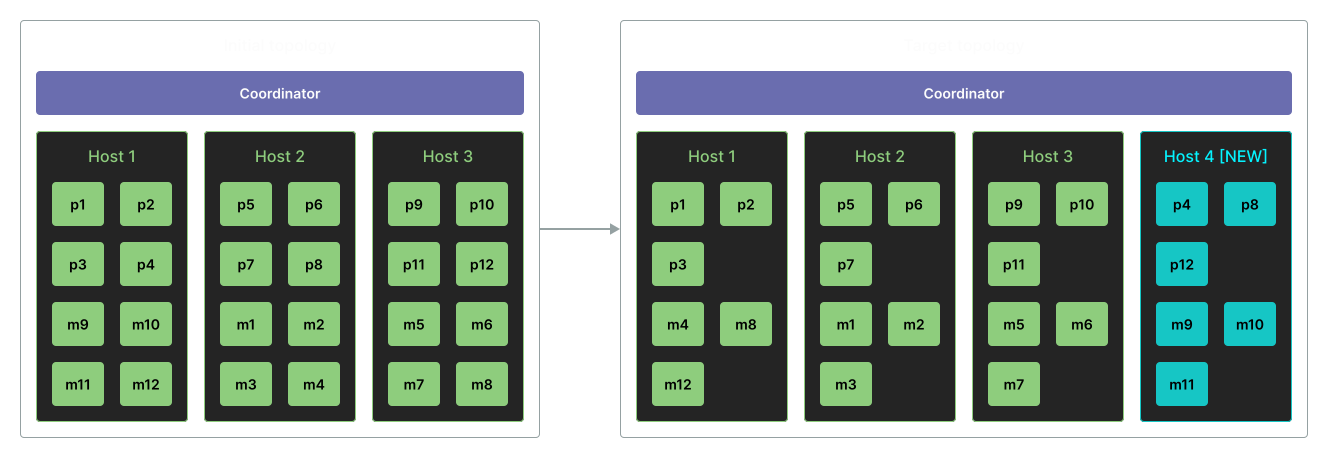
- 1: Adding a new host without changing the number of primary segments
-
As an example, new hardware is available, and existing segments can be redistributed so that the new hosts take part in the workload without increasing the Greengage DB parallelism level.
Figure 1. Adding a new host - 2: Decommissioning a host without changing the number of segments
-
A host is decommissioned, and its segments are moved to the remaining nodes.
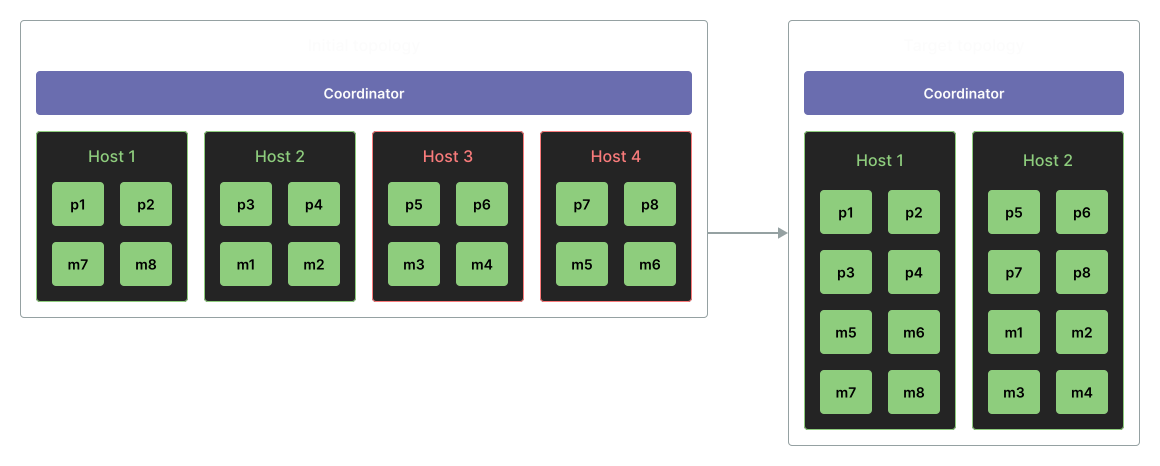 Figure 2. Host decommissioning
 - 3: Host decommissioning with a reduced number of segments
-
A host and segments running on it are removed from the Greengage cluster.
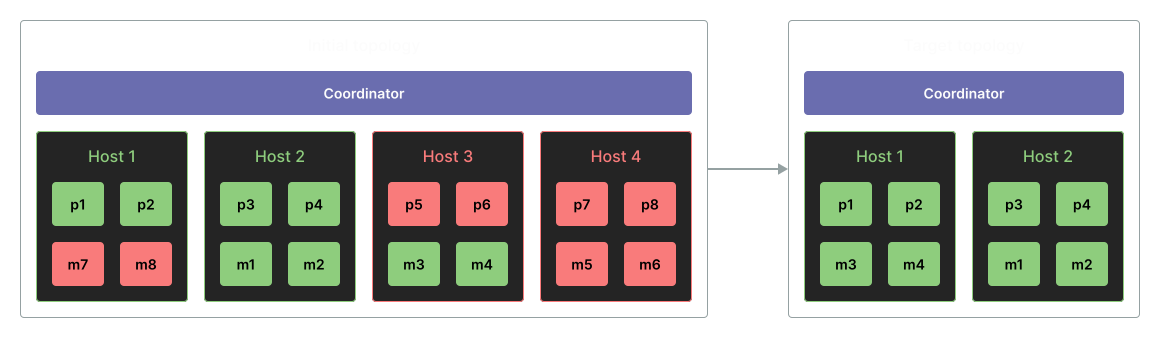 Figure 3. Segment shrink with host decommissioning
 - 4: Full migration to another set of hosts (except for the primary and standby coordinators)
-
An entire cluster is moved to new machines, for example, during a data center migration. The number of segments remains unchanged.
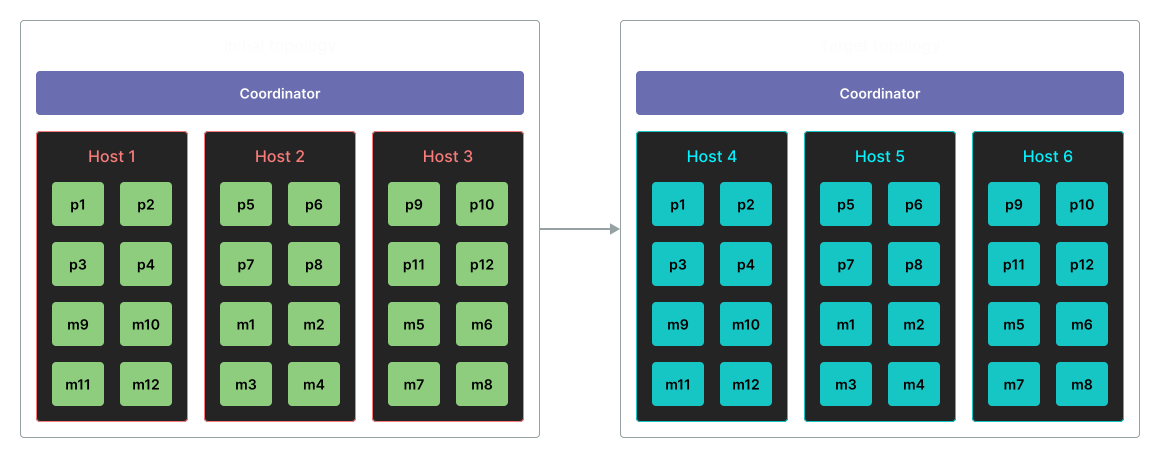 Figure 4. Migration to new hosts
 - 5: Migrating to other hosts with a changed number of segments
-
As in scenario 4, except that the degree of parallelism can be changed (currently only shrink is supported).
- 6: Changing the mirroring strategy
-
When changing the host set or the number of segments, you can also change the mirroring type. For Greengage, one of two types can be used: either
grouped— when all mirrors of a primary group are placed together on a separate host, orspread— when mirrors of a primary group are distributed across multiple nodes.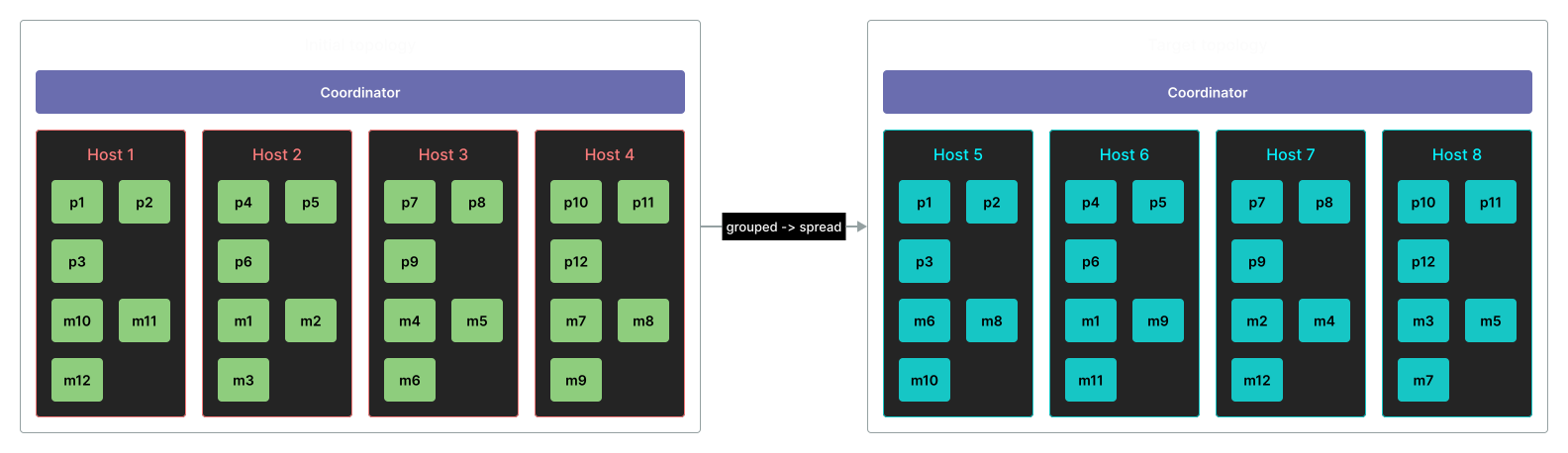 Figure 5. Changing the mirroring strategy
 - 7: Cluster shrink
-
The set of hosts remains unchanged, but the number of primary segments (and corresponding mirror segments) decreases. This can be useful when the workload decreases or when infrastructure resources need to be scaled down.
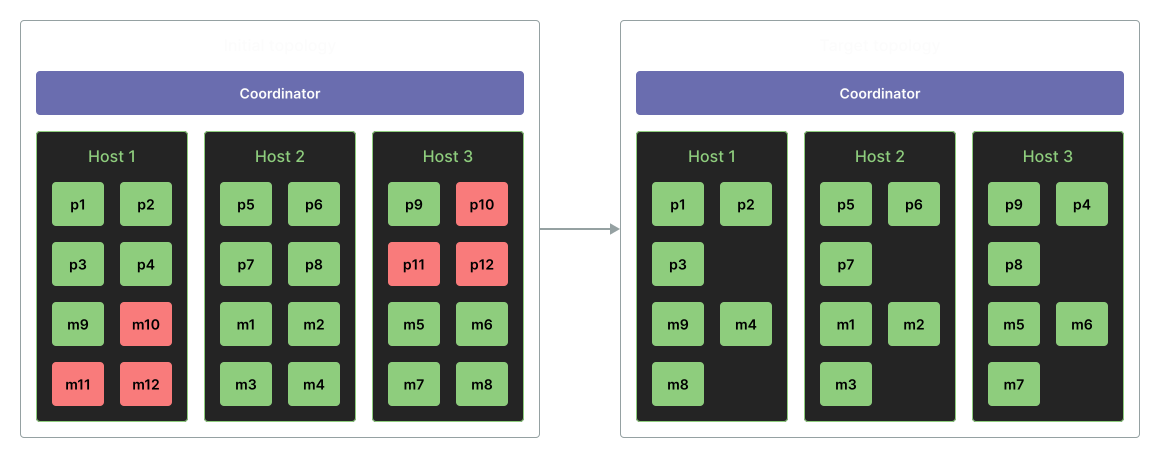 Figure 6. Cluster shrink
This article series discusses the key aspects and challenges of scaling analytical DBMSs and describes how the ggrebalance utility resolves them in the Greengage MPP DBMS.
The first article focuses on cluster shrink — reducing the number of cluster segments.
Part 1. Cluster shrink
Shrink is an operation that reduces the number of primary segments and their corresponding mirrors in a Greengage cluster.
It redistributes user data from the segments being removed to the remaining ones while preserving original characteristics such as indexes, distribution type (replicated, hashed), hierarchical relationships, dependencies, and so on.
This makes the implementation of the shrink procedure fundamentally different from the existing gpexpand utility.
1.1 How gpexpand works with tables
To understand what ggrebalance does during shrink, it is useful to briefly review how gpexpand adds new segments (Figure 7).
In the first stage, gpexpand prepares new segments: it locks the catalog for updates, preventing tables from being created on the old segment configuration, copies the coordinator backup to the new segment locations (the coordinator catalog is used as a template for new segments), starts the new segments, updates gp_segment_configuration (all subsystems implementing distributed operations rely on this relation for segment count and layout), releases the catalog lock, and stores the list of existing relations in a utility table based on a snapshot of pg_class across all databases.
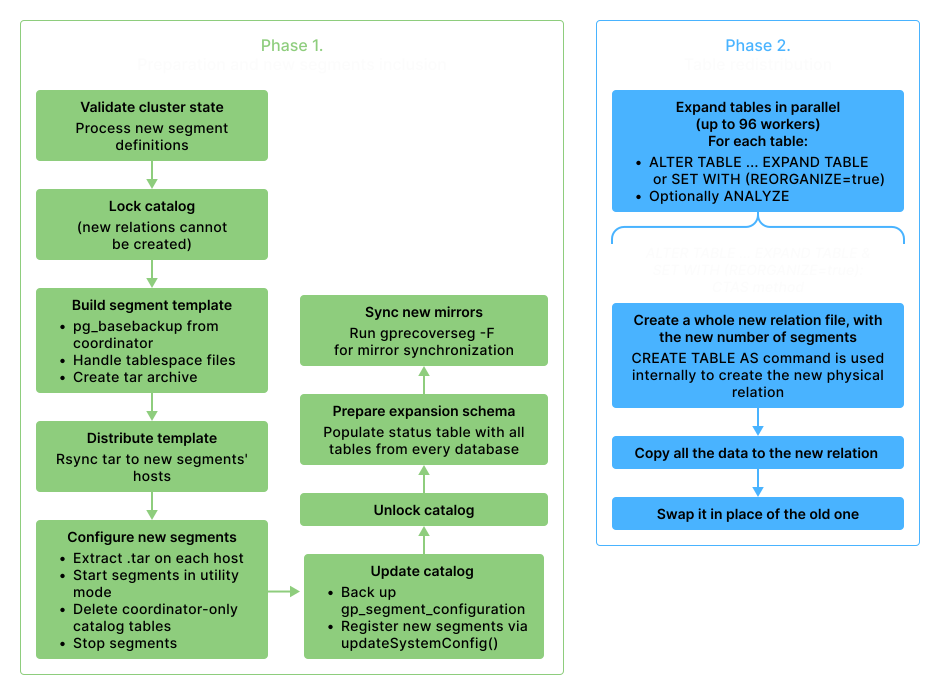
Figure 7. gpexpand operation
Finally, it synchronizes the mirrors of the newly added segments.
In the second stage, data is redistributed using ALTER TABLE … EXPAND: for each table in the previously prepared list, a temporary relation with an updated distribution is created, the source table is scanned on the old segment set, and its data is redistributed across all segments into the temporary relation.
To preserve the properties of the original relation while linking it to the redistributed data, ALTER TABLE swaps the relfilenode values of the new and original relations in pg_class, and then drops the temporary relation.
This data redistribution method is known as the CTAS approach and is a reliable way to reorganize data in Greengage (users can redistribute tables using the ALTER TABLE … SET WITH (reorganize=true) command).
However, the CTAS method has several drawbacks.
First, relation data is duplicated — in large clusters, this leads to a significant increase in disk space usage.
Second, creating a new relation increments the OID counter each time, which brings OID wraparound slightly closer. This is not critical in practice but still worth avoiding.
You can illustrate the creation of an intermediate relation in the CTAS approach by manually creating a table on a smaller number of segments and running CTAS into a temporary table:
create extension gp_debug_numsegments;
select gp_debug_set_create_table_default_numsegments(2);

create table t1 (i int, j int) distributed by (i);
insert into t1 select i, i from generate_series(1,100) i;

select * from gp_distribution_policy where localoid='t1'::regclass;
 localoid | policytype | numsegments | distkey | distclass
----------+------------+-------------+---------+-----------
    19086 | p          |           2 | 1       | 10054
(1 row)

select gp_debug_reset_create_table_default_numsegments();

explain (costs off) create temp table t_expanded as select * from t1;
                   QUERY PLAN
------------------------------------------------
 Redistribute Motion 2:3  (slice1; segments: 2)
   Hash Key: i
   ->  Seq Scan on t1
 Optimizer: Postgres-based planner
(4 rows)

select * from gp_distribution_policy where localoid='t_expanded'::regclass;
 localoid | policytype | numsegments | distkey | distclass
----------+------------+-------------+---------+-----------
    19097 | p          |           3 | 1       | 10054
(1 row)
As shown in the example, the original table is scanned on the initial set of segments, after which tuples are redistributed across the entire cluster.
After redistribution, relfilenode is swapped, and the temporary relation is dropped.
The third drawback is that at the end of ALTER TABLE … EXPAND, indexes are fully rebuilt.
This introduces an additional I/O load and increases the operation time proportionally to the number and size of indexes.
Shrink, in turn, also follows the same redistribution principles: the target number of segments is lower than the current one, and redistribution must complete before gp_segment_configuration is updated.
This means that during redistribution, the cluster still operates with the old number of segments, and all query routing mechanisms continue to function as before.
1.2 Alternative approach: INSERT instead of CTAS
In ggrebalance, table shrink uses an alternative approach, which required enhancements to the DBMS core: data redistribution via a target INSERT, implemented through the newly introduced ALTER TABLE <name> REBALANCE <target_segment_count> command.
This approach covers both expansion (using CTAS in release 1.0) and shrink, which is the focus of this article.
When reducing the number of segments, instead of creating an intermediate relation, the INSERT approach streams data directly from the segments being removed to the remaining ones by executing a query. The planner is also extended to support the shrink case; outside ALTER TABLE … REBALANCE, the execution plan differs:
select * from gp_distribution_policy where localoid='t1'::regclass;
 localoid | policytype | numsegments | distkey | distclass
----------+------------+-------------+---------+-----------
    19112 | p          |           3 | 1       | 10054
(1 row)

explain (costs off) insert into t1 select * from t1 where gp_segment_id in (2);
                         QUERY PLAN
-------------------------------------------------------------
 Insert on t1
   ->  Redistribute Motion 1:2  (slice1; segments: 1)
         Hash Key: t1_1.i
               ->  Seq Scan on t1 t1_1
                    Filter: (gp_segment_id = ANY'{2}'::integer[])
 Optimizer: Postgres-based planner
(6 rows)
When implementing the ALTER TABLE … REBALANCE command, scheduler changes were introduced for the shrink case.
First, the number of distribution segments on insert into the target relation was adjusted, creating a distribution conflict between the insert relation and the INSERT subplan.
When this conflict is detected, the scheduler adds a Redistribute Motion.
Second, to execute the scan of t1 directly on the shrink segments, the predicate gp_segment_id IN ({set of shrunk content IDs}) is added, explicitly indicating where the scan is performed.
The first slice is executed on the segments being removed, while the root slice, where the insert is performed, is launched on the target segments.
As a result, resolving redistribution on the INSERT side avoids unnecessary intermediate data duplication (except, of course, for tuples originating from the segments being removed) and eliminates index rebuilding.
The difference between the two approaches is clear even in a conceptual example.
Assume a cluster with 6 segments is shrunk to 4.
For a 600 GB table evenly distributed across 6 segments (~100 GB per segment), the CTAS approach would create a full temporary copy of the table during shrink (600 GB of additional data on disk).
The INSERT approach moves only the rows from segments 4 and 5, that is, about 200 GB.
Until the segments are removed from the cluster, this data exists in two copies, but overall resource consumption is significantly lower.
1.3 Implementation as a finite-state machine
The previously mentioned gpshrink uses a simple imperative implementation approach (written as a single Python file, similar to gpexpand).
It relies on straightforward if/elif/else control flow, where progress is essentially a numbered sequence of steps without formal validation of allowed transitions between them.
ggrebalance, in turn, introduces more control over the shrink process.
The shrink operation in ggrebalance is implemented as a deterministic finite-state machine (FSM) based on the transitions Python library, with different types of states: ephemeral states (not persisted anywhere, required for transition mechanics but irrelevant to the shrink logic itself), main operation states (persisted in the database and ordered), and rollback states.
The library allows defining state transition rules and enforcing them during execution.
It also provides a flexible system of hooks and callbacks that can be executed before or after transitions; they can be bound to specific states, define additional transition conditions, handle exceptions, and more.
In other words, the library is well-suited for describing complex processes.
A simplified view of the architecture, without listing all states and transitions, is shown in Figure 8.
ggrebalance is built around several nested finite-state machines; this design separates responsibilities across levels and persists each level’s state in the database, enabling recovery after interruptions.
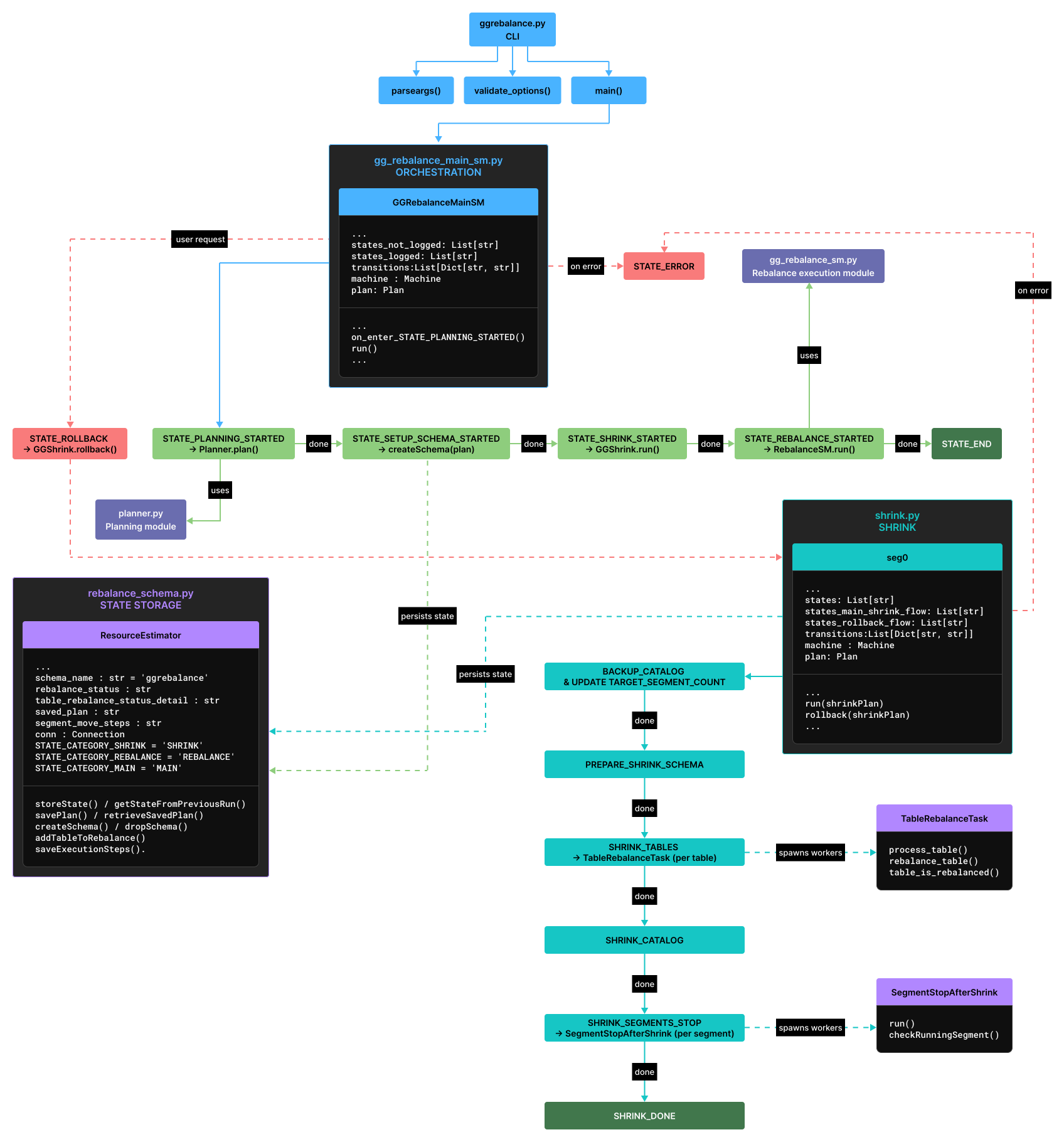
Figure 8. GGRebalance finite state machine implementation
The GGRebalanceMainSM and GGShrink classes define explicit state graphs and transitions between them.
Each transition is stored in the service ggrebalance schema (Figure 9) in the postgres database.
This ensures reentrancy: after an interruption, the utility reads the last committed state and resumes execution from the next step.
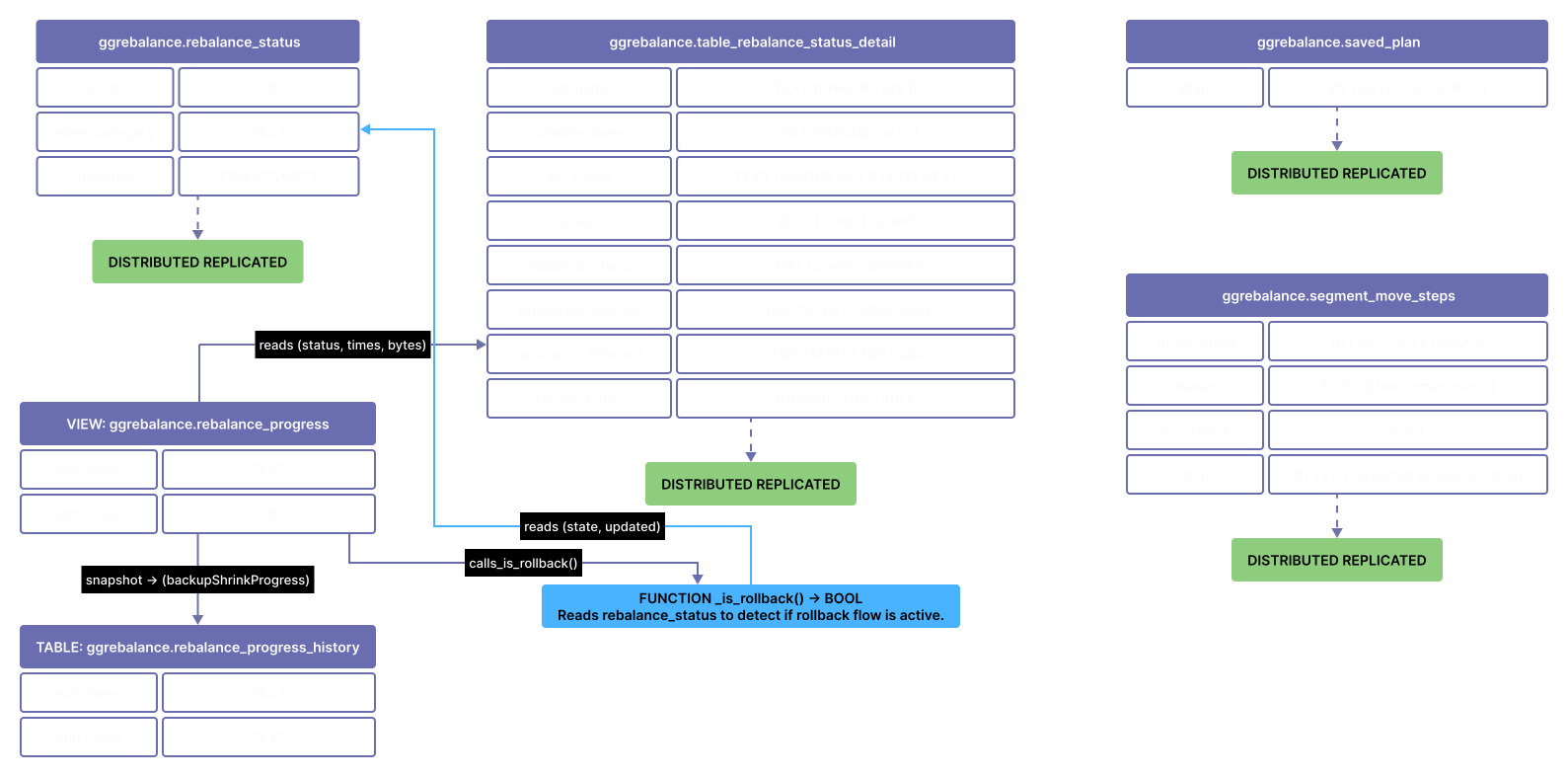
Figure 9. Utility tables of the ggrebalance schema
As an example, in a shrink scenario, the status recording may look as follows:
select * from ggrebalance.rebalance_status;
                            state                             | state_category |            updated
--------------------------------------------------------------+----------------+-------------------------------
 STATE_SETUP_SCHEMA_STARTED                                   | MAIN           | 2026-05-07 12:30:28.022483+00
 STATE_SETUP_SCHEMA_DONE                                      | MAIN           | 2026-05-07 12:30:28.07895+00
 STATE_EXECUTOR_STARTED                                       | MAIN           | 2026-05-07 12:30:28.116222+00
 STATE_BACKUP_CATALOG_AND_UPDATE_TARGET_SEGMENT_COUNT_STARTED | SHRINK         | 2026-05-07 12:30:29.728506+00
 STATE_BACKUP_CATALOG_AND_UPDATE_TARGET_SEGMENT_COUNT_DONE    | SHRINK         | 2026-05-07 12:30:29.769091+00
 STATE_PREPARE_SHRINK_SCHEMA_STARTED                          | SHRINK         | 2026-05-07 12:30:29.933573+00
 STATE_PREPARE_SHRINK_SCHEMA_DONE                             | SHRINK         | 2026-05-07 12:30:29.990288+00
 STATE_SHRINK_TABLES_STARTED                                  | SHRINK         | 2026-05-07 12:31:48.671078+00
 STATE_SHRINK_TABLES_DONE                                     | SHRINK         | 2026-05-07 12:31:49.227031+00
 STATE_SHRINK_CATALOG_STARTED                                 | SHRINK         | 2026-05-07 12:32:39.541764+00
 STATE_SHRINK_CATALOG_DONE                                    | SHRINK         | 2026-05-07 12:32:40.085748+00
 STATE_SHRINK_SEGMENTS_STOP_STARTED                           | SHRINK         | 2026-05-07 12:32:55.979319+00
 STATE_SHRINK_SEGMENTS_STOP_DONE                              | SHRINK         | 2026-05-07 12:32:56.177167+00
 STATE_SHRINK_DONE                                            | SHRINK         | 2026-05-07 12:32:56.323938+00
 STATE_SHRINK_STARTED                                         | MAIN           | 2026-05-07 12:32:56.464615+00
 STATE_SHRINK_DONE                                            | MAIN           | 2026-05-07 12:32:56.620682+00
 STATE_EXECUTOR_DONE                                          | MAIN           | 2026-05-07 12:32:57.107649+00
(17 rows)
The finite-state machine includes several independent operation sequences: the main utility flow (orchestration of all operations), rollback of the main flow, the shrink flow (responsible only for shrink), rollback of the shrink flow, the segment balancing flow, and rollback of segment balancing. Cluster balancing and planning moves to achieve an even distribution of segments will be covered in the next parts of the series.
Next, we examine the key stages of the shrink flow in more detail.
- STATE_BACKUP_CATALOG_AND_UPDATE_TARGET_SEGMENT_COUNT_STARTED
-
Inside the transaction, a catalog lock (
gp_expand_lock_catalog) is acquired to prevent tables from being created with the old segment count in concurrent sessions. Thengp_toolkit.gp_set_rebalance_numsegments(<target_segnum>)is called — it sets the new segment count for subsequent sessions, which will create relations after shrink starts. A snapshot of the currentgp_segment_configurationstate is also saved to a file on disk: after records are removed fromgp_segment_configuration, information about the segments being removed will no longer be available in the catalog, but it is still required for correctly stopping them. - STATE_SHRINK_TABLES_STARTED
-
A parallel worker pool executes
ALTER TABLE … REBALANCE <target_numsegments>for each table in the previously prepared queue (similar togpexpand). On successful completion, each worker sets the table status todonein the service table. The level of parallelism is controlled by the--parallelflag. Each table is retried up to two times in case of transactional conflicts (for example, concurrent DDL operations dropping the table while it is being redistributed). - STATE_SHRINK_CATALOG_STARTED
-
Point of no return. In a single transaction, segment records with
content >= target_numsegmentsare removed fromgp_segment_configuration, and the target segment count for creating new relations is set as the cluster default by callinggp_toolkit.gp_reset_rebalance_numsegments(). After this transaction is committed, the cluster operates with a reduced number of segments. - STATE_SHRINK_SEGMENTS_STOP_STARTED
-
Processes on the removed segments may still be running despite their removal from the catalog.
ggrebalancestops them correctly using the previously saved configuration snapshot. Primary segments are stopped first, followed by mirrors, to avoid replication hangs. The operation is executed in parallel by a worker pool, with the size controlled by the--batch-sizeflag.
1.4 Analyzing a shrink scenario
Consider a practical example from Figure 6: a cluster of 3 hosts with 12 primary segments (4 per host), where the number of segments needs to be reduced to 9 and balanced to 3 segments per host.
The mirroring strategy remains unchanged (grouped).
select * from gp_segment_configuration ;
 dbid | content | role | preferred_role | mode | status | port | hostname | address |               datadir
------+---------+------+----------------+------+--------+------+----------+---------+-------------------------------------
    1 |      -1 | p    | p              | n    | u      | 7000 | cdw      | cdw     | /home/gpadmin/.data/gpseg-1
   10 |       8 | p    | p              | s    | u      | 7010 | sdw3     | sdw3    | /home/gpadmin/.data/primary/gpseg8
   22 |       8 | m    | m              | s    | u      | 7060 | sdw1     | sdw1    | /home/gpadmin/.data/mirror/gpseg8
    2 |       0 | p    | p              | s    | u      | 7002 | sdw1     | sdw1    | /home/gpadmin/.data/primary/gpseg0
   14 |       0 | m    | m              | s    | u      | 7052 | sdw2     | sdw2    | /home/gpadmin/.data/mirror/gpseg0
    3 |       1 | p    | p              | s    | u      | 7003 | sdw1     | sdw1    | /home/gpadmin/.data/primary/gpseg1
   15 |       1 | m    | m              | s    | u      | 7053 | sdw2     | sdw2    | /home/gpadmin/.data/mirror/gpseg1
    4 |       2 | p    | p              | s    | u      | 7004 | sdw1     | sdw1    | /home/gpadmin/.data/primary/gpseg2
   16 |       2 | m    | m              | s    | u      | 7054 | sdw2     | sdw2    | /home/gpadmin/.data/mirror/gpseg2
    5 |       3 | p    | p              | s    | u      | 7005 | sdw1     | sdw1    | /home/gpadmin/.data/primary/gpseg3
   17 |       3 | m    | m              | s    | u      | 7055 | sdw2     | sdw2    | /home/gpadmin/.data/mirror/gpseg3
    6 |       4 | p    | p              | s    | u      | 7006 | sdw2     | sdw2    | /home/gpadmin/.data/primary/gpseg4
   18 |       4 | m    | m              | s    | u      | 7056 | sdw3     | sdw3    | /home/gpadmin/.data/mirror/gpseg4
    7 |       5 | p    | p              | s    | u      | 7007 | sdw2     | sdw2    | /home/gpadmin/.data/primary/gpseg5
   19 |       5 | m    | m              | s    | u      | 7057 | sdw3     | sdw3    | /home/gpadmin/.data/mirror/gpseg5
    8 |       6 | p    | p              | s    | u      | 7008 | sdw2     | sdw2    | /home/gpadmin/.data/primary/gpseg6
   20 |       6 | m    | m              | s    | u      | 7058 | sdw3     | sdw3    | /home/gpadmin/.data/mirror/gpseg6
    9 |       7 | p    | p              | s    | u      | 7009 | sdw2     | sdw2    | /home/gpadmin/.data/primary/gpseg7
   21 |       7 | m    | m              | s    | u      | 7059 | sdw3     | sdw3    | /home/gpadmin/.data/mirror/gpseg7
   11 |       9 | p    | p              | s    | u      | 7011 | sdw3     | sdw3    | /home/gpadmin/.data/primary/gpseg9
   23 |       9 | m    | m              | s    | u      | 7061 | sdw1     | sdw1    | /home/gpadmin/.data/mirror/gpseg9
   12 |      10 | p    | p              | s    | u      | 7012 | sdw3     | sdw3    | /home/gpadmin/.data/primary/gpseg10
   24 |      10 | m    | m              | s    | u      | 7062 | sdw1     | sdw1    | /home/gpadmin/.data/mirror/gpseg10
   13 |      11 | p    | p              | s    | u      | 7013 | sdw3     | sdw3    | /home/gpadmin/.data/primary/gpseg11
   25 |      11 | m    | m              | s    | u      | 7063 | sdw1     | sdw1    | /home/gpadmin/.data/mirror/gpseg11
(25 rows)

select hostname,role, array_agg(content) from gp_segment_configuration group by hostname, role order by hostname;
 hostname | role |  array_agg
----------+------+-------------
 cdw      | p    | {-1}
 sdw1     | p    | {0,1,2,3}
 sdw1     | m    | {8,9,10,11}
 sdw2     | m    | {0,1,2,3}
 sdw2     | p    | {4,5,6,7}
 sdw3     | m    | {4,5,6,7}
 sdw3     | p    | {8,9,10,11}
(7 rows)
Important note: shrinking a cluster means removing segments whose content_id values correspond to the tail of the sequence of all content_id values after removing <target_segment_count> from it.
Due to the specifics of Greengage hashing, an arbitrary segment cannot be removed — only segments from the end of the sequence.
The command:
$ ggrebalance -x 9 --parallel 8 --batch-size 4Before startup, ggrebalance ensures that no competing utilities (gpexpand, gprecoverseg, gpbackup, etc.) are running, verifies that all primary segments are available, and creates a PID file to prevent parallel launches.
Next, the following steps are performed:
-
Shrink and balancing of the remaining segments is planned.
-
A service schema is created, and the shrink plan is stored.
-
The catalog is locked,
gp_set_rebalance_numsegments(9)is set, and a snapshot ofgp_segment_configurationis saved. -
A list of tables with
numsegments > 9across all databases is collected. -
For each table,
ALTER TABLE … REBALANCE 9is executed in parallel — rows from segments 9, 10, 11 are inserted into segments 0—8. -
Records for segments 9, 10, 11 are removed from
gp_segment_configuration. -
Primary segments are stopped in parallel, followed by their mirrors.
The sample output is as follows:
20260426:19:06:46:033224 ggrebalance:cdw:gpadmin-[INFO]:-Init gparray from catalog
20260426:19:06:46:033224 ggrebalance:cdw:gpadmin-[INFO]:-Planning shrink
20260426:19:06:46:033224 ggrebalance:cdw:gpadmin-[INFO]:-Validation of rebalance possibility
20260426:19:06:46:033224 ggrebalance:cdw:gpadmin-[INFO]:-Planning rebalance moves. Can take up to 60s.
20260426:19:06:46:033224 ggrebalance:cdw:gpadmin-[INFO]:-Running randomized plan improvement with seed:315919769283260131213658672706621802564
20260426:19:06:46:033224 ggrebalance:cdw:gpadmin-[INFO]:-Estimating resource requirements for 4 segment moves...
20260426:19:06:47:033224 ggrebalance:cdw:gpadmin-[INFO]:-Validating available disk space on target hosts...
20260426:19:06:47:033224 ggrebalance:cdw:gpadmin-[INFO]:-Disk space validation completed successfully
20260426:19:06:47:033224 ggrebalance:cdw:gpadmin-[INFO]:-Estimated total data to move: 102.87 GB
20260426:19:06:47:033224 ggrebalance:cdw:gpadmin-[INFO]:-Final plan:
================================================================================
                                  SHRINK PLAN
================================================================================

Target Segment Count: 9

-------------------------------SEGMENTS TO REMOVE-------------------------------
Total segments to shrink: 3

  [1] Segment Pair:
      Primary:
        Content:  9
        DbId:     11
        Host:     sdw3
        Datadir:  /home/gpadmin/.data/primary/gpseg9
        Port:     7011
      Mirror:
        Content:  9
        DbId:     23
        Host:     sdw1
        Datadir:  /home/gpadmin/.data/mirror/gpseg9
        Port:     7061

  [2] Segment Pair:
      Primary:
        Content:  10
        DbId:     12
        Host:     sdw3
        Datadir:  /home/gpadmin/.data/primary/gpseg10
        Port:     7012
      Mirror:
        Content:  10
        DbId:     24
        Host:     sdw1
        Datadir:  /home/gpadmin/.data/mirror/gpseg10
        Port:     7062

  [3] Segment Pair:
      Primary:
        Content:  11
        DbId:     13
        Host:     sdw3
        Datadir:  /home/gpadmin/.data/primary/gpseg11
        Port:     7013
      Mirror:
        Content:  11
        DbId:     25
        Host:     sdw1
        Datadir:  /home/gpadmin/.data/mirror/gpseg11
        Port:     7063

---------------------------------BALANCE MOVES----------------------------------
Total moves planned: 4

  [1] Move Segment(content=3, dbid=5, role=p) [8.92 GB]
      From: sdw1:7005 → /home/gpadmin/.data/primary/gpseg3
      To:   sdw3:7005 → /home/gpadmin/.data/primary/gpseg3

  [2] Move Segment(content=3, dbid=17, role=m) [7.63 GB]
      From: sdw2:7055 → /home/gpadmin/.data/mirror/gpseg3
      To:   sdw1:7055 → /home/gpadmin/.data/mirror/gpseg3

  [3] Move Segment(content=7, dbid=9, role=p) [8.57 GB]
      From: sdw2:7009 → /home/gpadmin/.data/primary/gpseg7
      To:   sdw3:7009 → /home/gpadmin/.data/primary/gpseg7

  [4] Move Segment(content=7, dbid=21, role=m) [10.1 GB]
      From: sdw3:7059 → /home/gpadmin/.data/mirror/gpseg7
      To:   sdw1:7059 → /home/gpadmin/.data/mirror/gpseg7

================================================================================
20260426:19:06:48:033224 ggrebalance:cdw:gpadmin-[INFO]:-Created "ggrebalance" schema
20260426:19:06:49:033224 ggrebalance:cdw:gpadmin-[INFO]:-Updated target segment count to 9
20260426:19:06:50:033224 ggrebalance:cdw:gpadmin-[INFO]:-Initiated list of tables to rebalance
20260426:19:06:50:033224 ggrebalance:cdw:gpadmin-[INFO]:-Start tables rebalance for shrink
20260426:19:06:50:033224 ggrebalance:cdw:gpadmin-[INFO]:-Tables to process 0
20260426:19:06:50:033224 ggrebalance:cdw:gpadmin-[INFO]:-Tables rebalance complete
20260426:19:06:50:033224 ggrebalance:cdw:gpadmin-[INFO]:-Start catalog shrink
20260426:19:06:50:033224 ggrebalance:cdw:gpadmin-[INFO]:-Catalog shrink complete
20260426:19:06:50:033224 ggrebalance:cdw:gpadmin-[INFO]:-Stopping shrinked segments...
20260426:19:06:51:033224 ggrebalance:cdw:gpadmin-[INFO]:-Summary of shrinked segments:
20260426:19:06:51:033224 ggrebalance:cdw:gpadmin-[INFO]:-segment stopped ok - sdw3:/home/gpadmin/.data/primary/gpseg9:content=9:dbid=11:role=p:preferred_role=p:mode=s:status=u
20260426:19:06:51:033224 ggrebalance:cdw:gpadmin-[INFO]:-segment stopped ok - sdw3:/home/gpadmin/.data/primary/gpseg10:content=10:dbid=12:role=p:preferred_role=p:mode=s:status=u
20260426:19:06:51:033224 ggrebalance:cdw:gpadmin-[INFO]:-segment stopped ok - sdw3:/home/gpadmin/.data/primary/gpseg11:content=11:dbid=13:role=p:preferred_role=p:mode=s:status=u
20260426:19:06:51:033224 ggrebalance:cdw:gpadmin-[INFO]:-segment stopped ok - sdw1:/home/gpadmin/.data/mirror/gpseg9:content=9:dbid=23:role=m:preferred_role=m:mode=s:status=u
20260426:19:06:51:033224 ggrebalance:cdw:gpadmin-[INFO]:-segment stopped ok - sdw1:/home/gpadmin/.data/mirror/gpseg10:content=10:dbid=24:role=m:preferred_role=m:mode=s:status=u
20260426:19:06:51:033224 ggrebalance:cdw:gpadmin-[INFO]:-segment stopped ok - sdw1:/home/gpadmin/.data/mirror/gpseg11:content=11:dbid=25:role=m:preferred_role=m:mode=s:status=u
20260426:19:06:51:033224 ggrebalance:cdw:gpadmin-[INFO]:-Shrink is complete
1.5 Comparison with CTAS
The theoretical advantage of the INSERT approach over CTAS is that the amount of data moved is proportional to the share of segments being removed, rather than the full size of the tables.
To verify this claim, a series of experiments was conducted to evaluate shrink performance.
The first set of measurements compares the execution speed of ALTER TABLE … REBALANCE based on the INSERT logic with the same operation implemented via CTAS.
A Greengage cluster consisting of 8 hosts and 64 primary segments was deployed in the cloud.
The segment host specifications and cluster configuration are briefly summarized in Table 1.
Cloud provider |
Yandex Cloud |
OS |
Ubuntu 22.04 |
#vCPU |
32 |
RAM |
64 GB |
Disks |
2 SSDs, 1 TB each |
MTU |
9000 |
txqueuelen |
10000 |
gp_interconnect_type |
udpifc |
gp_max_packet_size |
8192 |
gp_interconnect_queue_depth |
4 |
The following scenarios were considered:
-
Light shrink:
64 → 56— 12.5% of data is moved (assuming uniform distribution). -
Shrink
64 → 32— 50% of data is moved. -
Aggressive shrink
64 → 16— 75% of data is moved.
The cluster was populated with a TPC-DS dataset adapted for Greengage DB, with a total size of approximately 2 TB (generated with scale factor = 3000).
| table_name | access_method | compression_type | total_size | uncompressed_size | compression_ratio |
|---|---|---|---|---|---|
store_sales |
ao_column |
zstd, level=5 |
464 GB |
983 GB |
2.12 |
catalog_sales |
ao_column |
zstd, level=5 |
348 GB |
741 GB |
2.13 |
web_sales |
ao_row |
zstd, level=5 |
227 GB |
453 GB |
1.99 |
store_returns |
heap |
115 GB |
|||
catalog_returns |
ao_column |
71 GB |
|||
web_returns |
ao_column |
25 GB |
|||
inventory |
ao_column |
zstd, level=5 |
4901 MB |
16 GB |
3.25 |
customer |
heap |
4483 MB |
|||
customer_address |
heap |
2021 MB |
|||
customer_demographics |
heap |
138 MB |
|||
item |
heap |
112 MB |
|||
time_dim |
heap |
12 MB |
|||
date_dim |
heap |
12 MB |
|||
catalog_page |
heap |
6464 kB |
|||
call_center |
heap |
3136 kB |
|||
web_page |
heap |
2048 kB |
|||
household_demographics |
heap |
2048 kB |
|||
promotion |
heap |
2048 kB |
|||
store |
heap |
2048 kB |
|||
reason |
heap |
1376 kB |
|||
web_site |
heap |
1344 kB |
|||
warehouse |
heap |
640 kB |
|||
ship_mode |
heap |
576 kB |
|||
income_band |
heap |
576 kB |
For a complete picture, we measured shrink execution time and disk space growth (disk amplification — the increase in occupied space relative to the logical volume of the data itself) for the following tables (all partitioned):
| table_name | total_size | access_method |
|---|---|---|
store_sales |
464 GB |
ao_column |
catalog_sales |
348 GB |
ao_column |
web_sales |
179 GB |
ao_row |
store_returns |
87 GB |
heap |
catalog_returns |
59 GB |
ao_column + add btree index |
For each of the five tables, shrink was performed three times using both the CTAS and INSERT methods — 30 runs in total.
After each shrink, the table was restored to its original number of segments using ALTER TABLE … REBALANCE <nsegs_origin>, which triggers CTAS-based redistribution; this means the post-shrink recovery step introduces the same noise into the measurement results.
The following values were measured:
-
Total blocking time of the client connection during rebalance, including the network round-trip from the coordinator to the client.
-
Disk amplification: every 10 seconds,
du -sbwas executed on all primary directories of all cluster segments (that is, allPGDATAdirectories). After shrink, the peak value from this sample was taken, and the ratio of the maximum observed volume ( ) to the cluster data size before shrink was calculated: These results can be compared with the theoretical values:where is the size of the redistributed relation, and is the size of the
i-th primary segment.
The theoretical estimate of disk bloat assumes that table data is evenly distributed across the cluster.
For the CTAS method, a full duplicate of the relation is expected to exist at some point during execution.
For INSERT, only a fraction of the data proportional to the number of segments being scanned is expected to be present.
Note that this is not full-scale load testing but a partial performance assessment using tools and resources available to regular developers. A detailed performance analysis on near-production data (~600 primary segments) will be published later.
Below are the measurement results.
| Table | Method | Before shrink | After shrink | Relation size before shrink | Relation size after shrink | Cluster size before shrink | Peak cluster size during shrink | Table disk amplification | Theoretical value | Time |
|---|---|---|---|---|---|---|---|---|---|---|
store_sales |
ctas |
64 |
56 |
463,96 GB |
464,53 GB |
1,32 TB |
1,77 TB |
1.3438 |
1,3514 |
00h:43m:51s |
store_sales |
insert |
64 |
56 |
464,23 GB |
464,3 GB |
1,32 TB |
1,37 TB |
1.0428 |
1,0439 |
00h:08m:28s |
catalog_sales |
ctas |
64 |
56 |
348,22 GB |
349,23 GB |
1,32 TB |
1,66 TB |
1.2555 |
1,2638 |
00h:30m:39s |
catalog_sales |
insert |
64 |
56 |
348,93 GB |
348,94 GB |
1,32 TB |
1,36 TB |
1.0317 |
1,0330 |
00h:05m:34s |
web_sales |
ctas |
64 |
56 |
227,7 GB |
228,2 GB |
1,32 TB |
1,54 TB |
1.1610 |
1,1725 |
00h:13m:42s |
web_sales |
insert |
64 |
56 |
228,18 GB |
228,19 GB |
1,32 TB |
1,35 TB |
1.0213 |
1,0216 |
00h:02m:18s |
store_returns |
ctas |
64 |
56 |
115,4 GB |
115,4 GB |
1,32 TB |
1,43 TB |
1.0813 |
1,0874 |
00h:05m:08s |
store_returns |
insert |
64 |
56 |
115,4 GB |
115,4 GB |
1,32 TB |
1,33 TB |
1.1990 |
1,0109 |
00h:00m:41s |
catalog_returns |
ctas |
64 |
56 |
72,63 GB |
68,23 GB |
1,32 TB |
1,37 TB |
1.0433 |
1,0550 |
00h:04m:24s |
catalog_returns |
insert |
64 |
56 |
68,52 GB |
74,73 GB |
1,31 TB |
1,33 TB |
1.0110 |
1,0065 |
00h:02m:02s |
store_sales |
ctas |
64 |
32 |
464,43 GB |
470,75 GB |
1,31 TB |
1,77 TB |
1.3479 |
1,3545 |
01h:03m:24s |
store_sales |
insert |
64 |
32 |
470,31 GB |
470,25 GB |
1,32 TB |
1,56 TB |
1.1758 |
1,1781 |
00h:29m:18s |
catalog_sales |
ctas |
64 |
32 |
348,96 GB |
353,59 GB |
1,32 TB |
1,67 TB |
1.2582 |
1,2643 |
00h:44m:29s |
catalog_sales |
insert |
64 |
32 |
352,91 GB |
352,94 GB |
1,33 TB |
1,5 TB |
1.1298 |
1,1326 |
00h:20m:01s |
web_sales |
ctas |
64 |
32 |
228,21 GB |
230,68 GB |
1,33 TB |
1,55 TB |
1.1668 |
1,1715 |
00h:20m:11s |
web_sales |
insert |
64 |
32 |
230,73 GB |
230,69 GB |
1,33 TB |
1,44 TB |
1.0852 |
1,0867 |
00h:09m:49s |
store_returns |
ctas |
64 |
32 |
115,4 GB |
115,39 GB |
1,33 TB |
1,44 TB |
1.0798 |
1,0867 |
00h:07m:55s |
store_returns |
insert |
64 |
32 |
115,4 GB |
115,39 GB |
1,33 TB |
1,38 TB |
1.0407 |
1,0433 |
00h:03m:59s |
catalog_returns |
ctas |
64 |
32 |
68,52 GB |
67,36 GB |
1,33 TB |
1,39 TB |
1.0487 |
1,0515 |
00h:05m:25s |
catalog_returns |
insert |
64 |
32 |
68,52 GB |
67,97 GB |
1,33 TB |
1,36 TB |
1.0245 |
1,0257 |
00h:03m:50s |
store_sales |
ctas |
64 |
16 |
470,65 GB |
475,66 GB |
1,33 TB |
1,79 TB |
1.3495 |
1,3538 |
01h:51m:26s |
store_sales |
insert |
64 |
16 |
475,09 GB |
475,03 GB |
1,33 TB |
1,68 TB |
1.2640 |
1,2679 |
01h:26m:28s |
catalog_sales |
ctas |
64 |
16 |
352,95 GB |
357,41 GB |
1,33 TB |
1,68 TB |
1.2607 |
1,2653 |
01h:18m:48s |
catalog_sales |
insert |
64 |
16 |
356,63 GB |
356,77 GB |
1,34 TB |
1,6 TB |
1.1964 |
1,1996 |
01h:00m:54s |
web_sales |
ctas |
64 |
16 |
230,82 GB |
232,56 GB |
1,34 TB |
1,56 TB |
1.1679 |
1,1722 |
00h:36m:32s |
web_sales |
insert |
64 |
16 |
232,69 GB |
232,6 GB |
1,34 TB |
1,51 TB |
1.1282 |
1,1302 |
00h:30m:22s |
store_returns |
ctas |
64 |
16 |
115,4 GB |
115,39 GB |
1,34 TB |
1,45 TB |
1.0815 |
1,0861 |
00h:13m:41s |
store_returns |
insert |
64 |
16 |
115,4 GB |
115,38 GB |
1,34 TB |
1,42 TB |
1.0621 |
1,0645 |
00h:11m:38s |
catalog_returns |
ctas |
64 |
16 |
68,52 GB |
66,79 GB |
1,34 TB |
1,4 TB |
1.0477 |
1,0511 |
00h:07m:57s |
catalog_returns |
insert |
64 |
16 |
68,52 GB |
68,6 GB |
1,34 TB |
1,39 TB |
1.0363 |
1,0383 |
00h:08m:27s |
Based on the obtained results, the following conclusions can be drawn. First, the CTAS "full table copy" hypothesis was confirmed experimentally. The bloat rate can be calculated both from relation size columns and from total cluster size values. Theory and practice match almost exactly. Minor deviations are explained by the host polling interval (segment sizes were collected every 10 seconds); the peak could have occurred between two measurements.
Second, it can be observed that INSERT is faster than CTAS (Table 5).
| Table | Scenario | CTAS | INSERT | Speedup |
|---|---|---|---|---|
store_sales |
64 → 56 |
43m 51s |
08m 28s |
5.2× |
store_sales |
64 → 32 |
1h 03m 24s |
29m 18s |
2.2× |
store_sales |
64 → 16 |
1h 51m 26s |
1h 26m 28s |
1.3× |
catalog_sales |
64 → 56 |
30m 39s |
05m 34s |
5.5× |
catalog_sales |
64 → 32 |
44m 29s |
20m 01s |
2.2× |
catalog_sales |
64 → 16 |
1h 18m 48s |
1h 00m 54s |
1.3× |
web_sales |
64 → 56 |
13m 42s |
02m 18s |
6.0× |
web_sales |
64 → 32 |
20m 11s |
09m 49s |
2.1× |
web_sales |
64 → 16 |
36m 32s |
30m 22s |
1.2× |
store_returns |
64 → 56 |
05m 08s |
00m 41s |
7.5× |
store_returns |
64 → 32 |
07m 55s |
03m 59s |
2.0× |
store_returns |
64 → 16 |
13m 41s |
11m 38s |
1.2× |
catalog_returns |
64 → 56 |
04m 24s |
02m 02s |
2.2× |
catalog_returns |
64 → 32 |
05m 25s |
03m 50s |
1.4× |
catalog_returns |
64 → 16 |
07m 57s |
08m 27s |
0.94× |
CTAS: growth is proportional to the target number of segments: 56, 32, 16.
The smaller the target, the longer the redistribution takes; the total time consists of two I/O phases of roughly equal weight.
For INSERT, the pattern is similar: execution time scales linearly with the amount of data moved, while network-based tuple redistribution contributes more significantly.
Thus, in terms of disk amplification, INSERT outperforms CTAS in all scenarios without exception.
The difference is greatest for 64 → 56, where INSERT generates 7—8 times less peak disk pressure than CTAS.
In terms of execution time, INSERT outperforms CTAS for 64 → 56 and 64 → 32 across all tables by a wide margin.
For 64 → 16, the advantage of INSERT decreases to 20—30% on large tables and disappears on small uncompressed AO tables.
This behavior is likely explained by the increase in generated WAL as the volume of redistributed data grows, since INSERT writes data row by row through the standard heap_insert / appendonly_insert paths, which, at wal_level >= replica, generate WAL for each block.
When moving 50% of store_sales data (232 GB), this results in a significant amount of WAL traffic.
On top of that, when inserting into an existing AO table, each segment must update rows in pg_aoseg — a system catalog that stores metadata for AO segment files.
Under a high parallel insert load, contention on this catalog table becomes observable.
You can also estimate throughput in GB/s using the following formula:
| Scenario | Throughput |
|---|---|
INSERT 64 → 56 |
0.114 GB/s |
INSERT 64 → 32 |
0.132 GB/s |
INSERT 64 → 16 |
0.067 GB/s |
CTAS 64 → 56 |
0.154 GB/s |
CTAS 64 → 32 |
0.061 GB/s |
CTAS 64 → 16 |
0.017 GB/s |
CTAS at 64 → 56 achieves the highest throughput of 0.154 GB/s — because all 56 target segments write in parallel and write workload is relatively large.
As the target number of segments decreases, throughput degrades.
This is because the formula accounts only for the amount of data written to the new table, while the actual execution time is also determined by reading the full source table, which becomes the dominant phase during aggressive shrink.
At 64 → 16, CTAS reads 100% of the data but writes only 25% — the remaining 75% of the read data is effectively redistributed across fewer segments. This imbalance between read and write workload explains the very low effective CTAS throughput under aggressive shrink conditions.
The experiments provide a quantitative basis for comparing two fundamentally different data redistribution strategies in a Greengage cluster.
The measured results show that the INSERT approach consistently outperforms CTAS in terms of disk amplification in all scenarios, and in execution time under moderate shrink, but loses its advantage under aggressive shrink due to increased WAL generation and contention on AO storage metadata.
The CTAS approach results in higher peak storage usage but demonstrates lower overhead under aggressive shrink conditions.
These aspects are planned for further optimization in upcoming releases.
However, beyond performance considerations, ggrebalance also aims to ensure safe shrink operations without data loss by persistently tracking execution state throughout the process.
1.6 Reentrancy and rolling back changes
Thanks to the persistent finite-state machine, ggrebalance can safely resume after any interruption (network failure, insufficient disk space, SIGINT, and so on).
The utility reads the last committed FSM state and compares it with the current cluster state:
def on_enter_STATE_CHECK_PREVIOUS_RUN(self) -> None:
    state_from_prev_run = self.rebalance_schema.getShrinkStateFromPreviousRun()
    # ...
    next_state = self.get_state_after_interrupt(state_from_prev_run)
    self.trigger(f'to_{next_state}')
At the table level, each entry in the service queue has a status: none — not processed, done — processed.
On resume, the worker pool processes only unprocessed tables; already redistributed ones are skipped.
This prevents duplicate work even after multiple interruptions during the SHRINK_TABLES step.
Let us explain the need to ensure reentrancy with an example.
Suppose a shrink process was started (see Figure 6) and began redistributing data.
At that time, a non-critical incident occurred in the Greengage cluster, after which it became necessary to restart the system and interrupt the shrink operation.
ggrebalance itself can be interrupted by:
-
a signal;
-
expiration of the time specified by the
--durationoption since the shrink started.
Suppose that the shrink process was interrupted in the following state:
20260518:01:44:00:215237 ggrebalance:cdw:gpadmin-[INFO]:-Complete table rebalance for "postgres"."public"."t1"
20260518:01:48:25:215310 ggrebalance:cdw:gpadmin-[ERROR]:-Failed to process the db object "postgres"."public"."t1" for 2 attempts
20260518:01:48:25:215310 ggrebalance:cdw:gpadmin-[INFO]:-Shrink was interrupted
20260518:01:48:25:215310 ggrebalance:cdw:gpadmin-[ERROR]:-ggrebalance failed: Shrink was interrupted
select db_name, schema_name, rel_name, status, rebalance_type, rebalance_finished from ggrebalance.table_rebalance_status_detail;

 db_name  | schema_name | rel_name | status | rebalance_type |      rebalance_finished
----------+-------------+----------+--------+----------------+-------------------------------
 postgres | public      | t2       | none   | SHRINK         |
 postgres | public      | t1       | done   | SHRINK         | 2026-05-18 01:55:13.607961+00
(2 rows)

select * from ggrebalance.rebalance_status;

                            state                             | state_category |            updated
--------------------------------------------------------------+----------------+---------
 STATE_SETUP_SCHEMA_STARTED                                   | MAIN           | 2026-05-18 01:53:08.035607+00
 STATE_SETUP_SCHEMA_DONE                                      | MAIN           | 2026-05-18 01:53:08.085633+00
 STATE_EXECUTOR_STARTED                                       | MAIN           | 2026-05-18 01:53:08.149228+00
 STATE_BACKUP_CATALOG_AND_UPDATE_TARGET_SEGMENT_COUNT_STARTED | SHRINK         | 2026-05-18 01:53:09.511508+00
 STATE_BACKUP_CATALOG_AND_UPDATE_TARGET_SEGMENT_COUNT_DONE    | SHRINK         | 2026-05-18 01:53:09.56808+00
 STATE_PREPARE_SHRINK_SCHEMA_STARTED                          | SHRINK         | 2026-05-18 01:53:09.691198+00
 STATE_PREPARE_SHRINK_SCHEMA_DONE                             | SHRINK         | 2026-05-18 01:53:09.744374+00
 STATE_SHRINK_TABLES_STARTED                                  | SHRINK         | 2026-05-18 01:54:02.855362+00
(7 rows)
The log shows that the t1 table was processed successfully, after which ggrebalance moved on to t2 but was interrupted before completing it.
This is also reflected in the table_rebalance_status_detail table: t1 has the done status with a completion timestamp, while t2 remains in the none state, meaning its rebalance was never recorded as started.
The rebalance_status table shows that the last persisted machine state is STATE_SHRINK_TABLES_STARTED — the FSM entered the table processing loop but did not complete it before the interruption.
At first glance, it might seem sufficient to simply resume from the same state and continue redistributing t2.
However, this is where one of the implementation details of the shrink operation becomes important: in the STATE_BACKUP_CATALOG_AND_UPDATE_TARGET_SEGMENT_COUNT_STARTED state, which precedes table redistribution, ggrebalance calls gp_toolkit.gp_set_rebalance_numsegments(target_count) — setting the target number of segments in the catalog.
This parameter is global and not tied to a particular session.
After the cluster is restarted, this parameter is reset to the default value — the full set of segments.
As a result, if new tables are created between the interruption of shrink and its restart, they will be distributed across the full segment set rather than the target one.
This creates a dangerous condition for shrink consistency and may lead to data loss on the segments being removed.
ggrebalance handles this and other edge cases by ensuring that segments are not removed until all tables have been redistributed.
Instead of resuming directly from the interruption point, ggrebalance takes a step back: it restores rebalance_numsegments for concurrent DDL operations, rescans all databases, and rebuilds the redistribution queue by selecting tables that still satisfy the distribution condition.
Without this logic, any cluster restart during shrink could turn into an incident: newly created tables would remain outside the operation, and the next ggrebalance run would either complete the shrink while ignoring them or require manual analysis of inconsistencies.
In this respect, gpshrink remains vulnerable to data loss during concurrent cluster activity.
The shrink rollback operation (ggrebalance --rollback) is available only before gp_segment_configuration is updated — that is, no later than the STATE_SHRINK_TABLES_DONE state.
Once the catalog has been updated, rollback becomes impossible, since the cluster already operates with the new number of segments.
When rollback is still allowed, the rollback flow starts and performs the following steps:
-
Resets the target number of segments (
gp_reset_rebalance_numsegments) — new tables are created again with the original number of segments. -
Builds a list of tables with the
donestatus — tables that have already been rebalanced to a smaller number of segments and must be restored. -
Runs
ALTER TABLE … REBALANCE <original_numsegments>in parallel for the tables in the list, redistributing rows back to the original segment count.
Rollback itself is fully reentrant: each step is persisted in the same rollback state flow (states_rollback_flow), and rerunning ggrebalance --rollback correctly resumes an interrupted rollback operation.
At the same time, tables already processed during rollback (their status has been reset to none) are not processed again.
Thus, both edge-case scenarios — "the operation was interrupted, and I want to continue" and "the operation was interrupted, and I want to restore everything to its original state" — are handled by ggrebalance deterministically and without manual intervention in the cluster state.
Do not confuse shrink rollback with cluster-balancing rollback (the following parts describe segment movement between hosts in more detail). Future releases are also expected to support full shrink rollback via a reverse expand operation.
Conclusion
In this topic, we explored the capabilities for scaling a Greengage cluster with the ggrebalance utility — a powerful tool for managing cluster resources and data volume.
The cluster shrink process was described in detail for cases where the number of primary segments must be reduced without data loss in the partitions being removed.
A shrink operation clearly demonstrates the gap between the conceptual simplicity of a task ("remove several segments") and the complexity of implementing it correctly in a production system.
The solution to this complexity is reflected in three key architectural decisions used throughout the ggrebalance implementation:
-
Persistent state machine. Ensures that an interruption at any point does not leave the system in an inconsistent state. Each significant transition is recorded in persistent storage before it takes effect.
-
Reentrancy at every stage. Ensures correct behavior when execution is resumed or repeated, without manual inspection of intermediate results. The state machine checks the actual database state rather than relying on assumptions. Each table is redistributed under strict control defined by valid state-machine transitions.
-
Ability to roll back changes. Before rows are removed from
gp_segment_configuration(the point of no return), tables can still be redistributed back to the original number of segments. Rollback is implemented as a complete, independent, and reentrant flow that can be interrupted and resumed multiple times.
In the following topics of the ggrebalance series, we discuss post-shrink cluster topology changes, including the physical relocation of segments between hosts to ensure an even load distribution across the cluster.